

In This Article
Phase 2 of Azure mandatory MFA affects one kind of job: a script or scheduled task that signs in as a user account and then changes something in Azure through Azure CLI, Azure PowerShell, infrastructure as code tools, the Azure REST API or the Azure SDK. Read operations are outside Phase 2, while Phase 1 already covers sign-ins to the Azure portal and admin centers, reads included. Jobs that sign in as a managed identity or a service principal sit outside the enforcement entirely. Microsoft charges nothing for a managed identity, and Microsoft Entra Workload ID Premium adds extra controls for $3.00 per workload identity per month.
Your nightly job can still read a record. Why does it stop when it tries to change one? The answer is the account it signs in as.
Somewhere in your institution there is an account that nobody thinks of as a person. It posts the nightly batch. It pulls the report the board sees on Monday. It moves files between the loan origination system and the archive at two in the morning. It has a name like svc-nightly or automation01, it has a password that was set in 2019, and it has never once been asked to approve a sign-in on somebody's phone.
That account is doing real work. Phase 2 reaches the jobs among these that sign in as that account and change an Azure resource through Azure's management tools. When one of those stops, the work stops, and the people who notice first are the ones waiting on a report that did not arrive.
Microsoft has spent two years closing the gap that lets accounts like that keep running on a password alone, and it documents the whole enforcement program publicly. The last phase of that change started rolling out in October 2025, and July 1, 2026 was the latest date an institution could postpone it to. Both dates are behind us. Check your tenant's enforcement status first, then each job's identity, the endpoint it calls and the operation it performs.
ABT manages Microsoft 365 tenants for more than 750 credit unions, banks, and mortgage companies. Every one of those tenants runs automation somewhere, and the work starts the same way: separating the accounts that belong to people from the accounts that belong to machines. What follows is what actually breaks, what does not, and what to move these accounts to.
The automation that stopped, and why
Microsoft's mandatory multifactor authentication program for Azure rolled out in two phases, and the distinction between them is the whole story for a bank or a credit union running scheduled jobs.
Phase 1 arrived in October 2024 and covered the places administrators click: the Azure portal, the Microsoft Entra admin center, and the Microsoft Intune admin center, for any create, read, update or delete operation. The Microsoft 365 admin center followed in February 2025. Phase 1 was a change for humans, and most institutions absorbed it without incident because humans carry phones.
Phase 2 began on October 1, 2025, and it covered the places scripts run: Azure CLI, Azure PowerShell, the Azure mobile app, infrastructure as code tooling, the REST API control plane, and the Azure SDK. Create, update and delete operations require multifactor authentication under Phase 2. Read operations do not.
That last detail is why the failure is so confusing when it arrives. A monitoring script that only reads sits outside this phase. A job that lists your virtual machines and then resizes one through Azure Resource Manager gets halfway through: the list succeeds, and the resize meets the MFA requirement the user account cannot satisfy. Teams spend a morning chasing a network problem that is actually an authentication decision.
- Phase 1 requires MFA in the Azure portal, the Microsoft Entra admin center and the Microsoft Intune admin center.
- The Microsoft 365 admin center joins Phase 1.
- Phase 2 starts rolling out for Azure CLI, Azure PowerShell, infrastructure as code, the REST API and the Azure SDK, on create, update and delete operations.
- The latest date an institution could postpone Phase 2 enforcement to.
- Your next stepPull your sign-in logs, list the user accounts that change Azure resources on a schedule, and confirm the list with each job's owner.
The scope boundary that matters
Phase 2 is enforced on the server side at Azure Resource Manager, so within this program the requests in scope are the ones targeting management.azure.com. Microsoft states that Microsoft Graph APIs are generally not in scope of this particular enforcement.
Read that narrowly. It is a statement about the boundary of the Azure mandatory multifactor authentication program. It is not a statement that Microsoft Graph is exempt from multifactor authentication under Conditional Access or any other control you or your provider have configured in the tenant.
Here is the part that decides whether any of this touches you. Microsoft draws the line at the type of identity:
Microsoft's own wording
"Workload identities, such as managed identities and service principals, aren't impacted by either phase of this MFA enforcement. If user identities are used to sign in as a service account to run automation (including scripts or other automated tasks), those user identities need to sign in with MFA once enforcement begins. User identities aren't recommended for automation."
And, more bluntly, from the same page's questions and answers: automation accounts are not in scope as long as they use a managed identity or a service principal, and any automation account set up as a user identity will be enforced upon.
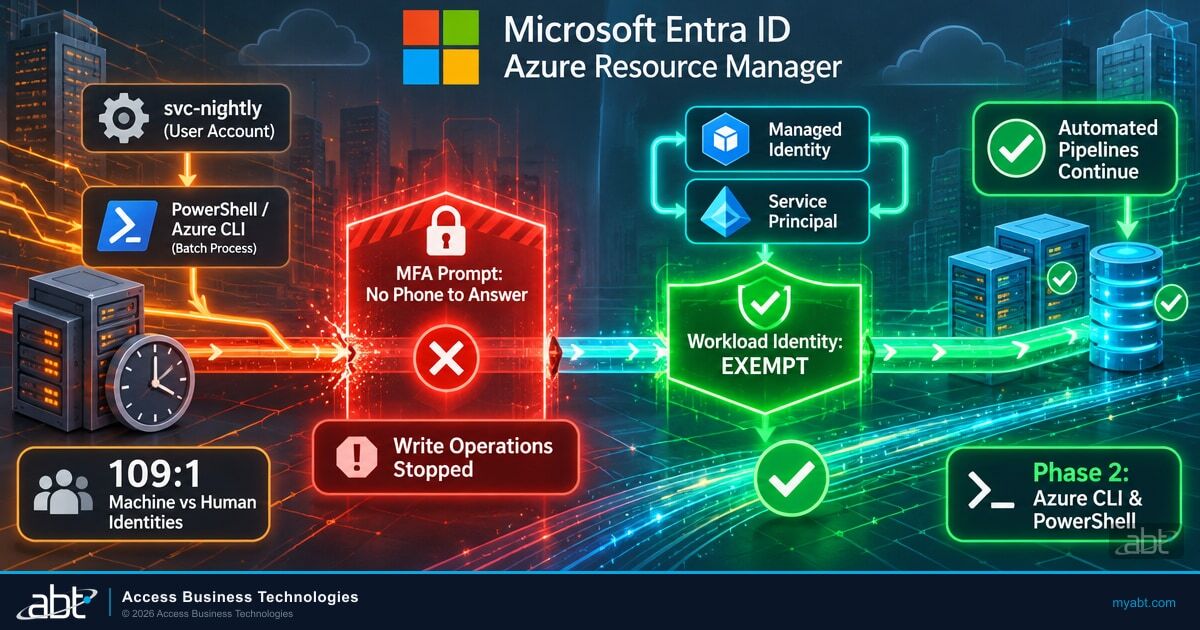
- A nightly job runs a script through Azure CLI or Azure PowerShell and asks Azure to change a resource.
- Azure Resource Manager applies Microsoft's mandatory MFA: create, update and delete operations require it, and read operations are outside Phase 2.
- The job signs in as a user account with a password and no phone, so Azure asks that account for MFA.
- Nobody is there to complete MFA, so Azure Resource Manager refuses the change.
- The fix: the job signs in as a managed identity or a service principal, which Microsoft states is outside both phases of this enforcement.
So the question is not whether your institution runs automation. Every institution does. The question is what kind of object in the directory that automation signs in as. If the answer is a licensed user account with a password, the enforcement applies to it exactly as it applies to your chief lending officer.
Three kinds of service account, and the one Microsoft warns against
Microsoft Entra ID has three native service account types, and they are not interchangeable.
| Type | Where it works | Credential it carries | Affected by mandatory MFA |
|---|---|---|---|
| Managed identity | Attached natively to Azure-hosted services; a user-assigned one can also be federated to a workload outside Azure | None that you handle; the platform manages it | No |
| Service principal | Anywhere, including outside Azure and multi-tenant | Client certificate, client secret, or a federated credential | No |
| User-based service account | Anywhere, but Microsoft recommends against it | A password, like any employee | Yes |
Microsoft's guidance on picking between them is unusually direct for product documentation. For services hosted in Azure, use a managed identity if the service supports one. For services that are not hosted in Azure, where managed identities are unavailable, use a service principal. And then: "We recommend that you not use a Microsoft Entra user account as a service account."
If you land on a service principal, the credential choice matters more than teams expect. Microsoft puts it plainly: "Certificates are more secure: use client certificates if possible. Unlike client secrets, client certificates cannot accidentally be embedded in code." A secret is a string that can be copied anywhere: a repository, a configuration file, a ticket somebody pasted it into, the chat message where an engineer sent one to a colleague on a Friday afternoon. A certificate moves that risk to its signing private key, which your team still has to protect, ideally in a key vault.

Why the Conditional Access exclusion did not help
When an institution discovers that a service account cannot complete multifactor authentication, the reflex is to write an exclusion. Exclude the account from the policy that requires it, document the exception, move on. That reflex is old, it is well intentioned, and against this particular enforcement it does nothing.
This enforcement belongs to Microsoft. Microsoft applies it to the specific client applications it lists, and for the Phase 2 set it applies server side at Azure Resource Manager, which means it does not run through the Conditional Access policies you write in your own tenant. The documentation is explicit that if you configured exceptions or exclusions in a policy, they no longer apply here, and that enforcement reaches all user accounts regardless of whether they are a break-glass account, an administrator account with an eligible role, or an account carrying a user exclusion.
Be precise about what that means, because the sentence is easy to over-read. Your Conditional Access exclusions still function normally for your own policies. Microsoft still recommends excluding emergency access accounts from ordinary Conditional Access policies. What changed is that an exclusion in your policy does not override Microsoft's enforcement. The two controls sit at different layers, and only one of them is yours.
The rule to carry out of this section
An exclusion is not a fix and never was. It is a note explaining why an account is less protected than the others. When the platform stops honoring the note, the only thing left is the underlying design decision, which is that a password-based user account was doing a machine's job.
There is a second-order effect worth naming. Exclusion lists accumulate. Each one is written for a reason that made sense that week, and almost nobody schedules the review that removes it. We wrote about that pattern in the Conditional Access exclusions list that nobody reviews, and service accounts are the single largest contributor to it. Cleaning up the identity type also cleans up the exclusion list, which is the part an examiner actually reads.
One more failure mode shows up at the same time. The OAuth 2.0 Resource Owner Password Credentials grant, the flow that lets a script pass a username and password directly, is incompatible with multifactor authentication. Once multifactor authentication is enabled for an account, applications built on that flow throw exceptions. Microsoft has deprecated UsernamePasswordCredential in its Azure Identity client libraries. If somebody in your institution wrote a helper years ago that signs in with a stored username and password, that helper is on borrowed time independent of anything else in this article.
Finding them, which is the hard part
Replacing a user-based service account is a small piece of work. Finding all of them is the project.
A user-based service account is, by construction, indistinguishable from an employee in the directory. It has a user object, it often holds a paid user license, it may sit in groups, and it often has a mailbox so that failure notifications land somewhere. Nothing about the object announces that a scheduled task depends on it. The institutional knowledge lives with whoever built the integration, and that person has frequently moved on.
The sign-in telemetry is where the truth is. Accounts that authenticate on a precise schedule, always from the same address, never from a phone, and never interactively, look like machines wearing a person's object. Accounts whose sign-ins cluster at 2:00 AM are strong leads. The logs show only jobs that ran inside your retention window, so reconcile the list against your schedulers and runbooks and confirm each account with the owner of the job. Accounts that have never registered an authentication method and have never had a password change are machines, or they are a dormant human account, and either answer is a finding.
Naming conventions are the first thing teams reach for and the least reliable thing they will find. The accounts that predate the convention are the ones with the longest tenure and the widest permissions, which is the opposite of the order you want to discover them in. The sign-in logs give you the candidates; reconciling them against schedulers and runbooks and confirming each one with its owner is what makes the list complete. That is the part institutions hand to us, because it takes sustained access to the logs and pattern reading across a full reporting cycle.
The account that runs your nightly batch looks exactly like a person in the directory. That is the entire problem, and it is why nobody has a list.
Two pieces of adjacent work make this inventory much faster, and most institutions already owe themselves both. The first is a working access review cycle in Microsoft Entra ID, which forces a named human to attest that each account still needs to exist. The second is an offboarding process that actually closes accounts, because an unreviewed service account and an unclosed departed-employee account are the same object with different stories.
While you are in the sign-in logs, look for the pattern we described in the Azure CLI password spray that did not trigger multifactor authentication. Attackers understand the value of an identity that cannot be challenged better than most defenders do, and the command-line surface is where they go looking. We traced one of those attacks end to end in the forgotten service accounts a password spray found, and the accounts it found were exactly the kind this inventory turns up.

What to move them to
Once you have the list, each account resolves through two questions. The first picks the kind of identity. The second picks what it authenticates with. A third step removes the credential altogether where the workload can support it.
Hosted in Azure and the service supports it: a managed identity. Running on a platform that supports workload identity federation: a service principal or a user-assigned managed identity, federated. Anywhere else: a service principal with a certificate.
A managed identity carries nothing you handle. A service principal takes a client certificate.
If the workload already has an external identity provider, federation removes the stored credential from either destination.
That third step is the one most institutions have not heard of, and it is the most interesting of the three. It is not a separate destination; it is a way to remove the credential from the destination you already chose. Workload identity federation lets an app registration or a user-assigned managed identity in Microsoft Entra ID trust tokens issued by an external identity provider. The external workload presents a token it already has, exchanges it for a Microsoft access token, and never holds a Microsoft secret at all.
Microsoft's own description of the problem it solves is worth quoting, because it is the argument for doing this work at all: stored application credentials "pose a security risk and have to be stored securely and rotated regularly. You also run the risk of service downtime if the credentials expire." Federation, in Microsoft's words, "eliminates the maintenance burden of manually managing credentials and eliminates the risk of leaking secrets or having certificates expire."
Read that as the specific claim it is. Federation removes the stored credential and the expiry outage that comes with it. It does not reduce what the identity is allowed to do once it authenticates. An over-permissioned federated identity is still over-permissioned, so the permissions review happens at the same time as the migration or it does not happen at all.
Supported scenarios cover most of what a financial institution actually runs outside Azure: workloads on any Kubernetes cluster including on-premises ones, GitHub Actions, Google Cloud, Amazon Web Services, SPIFFE and SPIRE, and Azure Pipelines service connections.
Sequence this around the batch calendar
Every one of these migrations changes how a running job authenticates, which means each one is a change that can stop a job. Month-end and quarter-end are the wrong weeks. Sequence the work so the highest-consequence integrations, the ones touching loan files, payments, and regulatory reporting, move first and move in a window where a failure is visible and recoverable the same day.
Governing the replacement, and what it costs
Moving an account from a user object to a workload identity solves the enforcement problem. It does not, on its own, solve the governance problem, and this is where most projects stop one step early.
Microsoft is candid about why these identities are harder to manage than people. Workload identities, in its documentation, "can't perform multifactor authentication," "often have no formal lifecycle process," and "need to store their credentials or secrets somewhere." Those three sentences describe every audit finding you are going to get about non-human access.
Conditional Access for workload identities is the control most teams reach for next, and it behaves differently from every other policy in the tenant. Four differences decide whether it does anything at all. It needs Workload Identities Premium licensing before a policy can be created or modified. Block access is the only grant control, so there is no option to require something stronger. It reaches single-tenant service principals registered in your own tenant, and not Microsoft or third-party multi-tenant applications, and not managed identities. And a service principal placed in a group is not covered by a policy assigned to that group.
When we onboard a tenant we check that last one by reading the policy assignment itself, because a policy that targets a group looks correctly configured from every screen an administrator would think to open. The managed identities get routed to a review of their privileged role assignments, or to a dated owner attestation, since no policy is going to reach them.
That fourth limit deserves emphasis because it fails silently. Group-based assignment is how every other policy in your tenant is scoped, so an engineer will naturally add the service principal to the group that the policy targets, watch the policy report as configured, and reasonably conclude the control is live. It is not. Nothing errors. The policy simply never evaluates for that identity. This is the class of gap that only surfaces when somebody verifies what a control would actually do, which is the same discipline we apply when verifying phishing-resistant multifactor authentication actually enforces.
Managed identities sit outside Conditional Access entirely. Where one holds a privileged Microsoft Entra or Azure role, review that role assignment in an access review; Microsoft's access reviews for service principals require Workload ID Premium plus Microsoft Entra ID P2 or ID Governance. For the rest, have the owner sign a dated attestation that the identity and its permissions still have a job. Either record gives you a named attestation to hand an examiner.
This is continuous work. New integrations arrive, permissions widen, and a service principal that was scoped correctly in March is over-scoped by September. ABT runs that cycle as M365 Guardian, the control layer we operate on top of the Microsoft 365 tenants we manage. It configures the Microsoft controls, monitors drift against a policy baseline, and puts the result in front of the people who have to attest to it.
Then there is the licensing, which rarely gets calculated. The identity itself carries no Microsoft charge: Microsoft's workload identities questions and answers list managed identities and workload identity federation as free. The engineering time to move each job is a separate cost, and the extra controls are what you pay Microsoft for. On Microsoft's United States public list pricing as of November 24, 2026, Microsoft Entra Workload ID Premium is $3.00 per workload identity per month paid yearly, and it adds Conditional Access for workload identities, ID Protection for workload identities, and access reviews for privileged service principals. Microsoft Entra ID P1 is $7.00 per user per month and Microsoft Entra ID P2 is $10.00 per user per month, both paid yearly. Microsoft Entra ID Governance is $7.00 per user per month.
| What you are paying for | US public list, November 2026 | Billing unit |
|---|---|---|
| Managed identity or workload identity federation | $0.00 | no charge |
| Microsoft Entra Workload ID Premium | $3.00 | per workload identity per month, paid yearly |
| Microsoft Entra ID P1 | $7.00 | per user per month, paid yearly |
| Microsoft Entra ID P2 | $10.00 | per user per month, paid yearly |
| Microsoft Entra ID Governance | $7.00 | per user per month, paid yearly |
Source: Microsoft Entra pricing, United States public list, retrieved November 24, 2026.
Microsoft spells out the trade directly: you can reclaim the user-based license and add a workload identities license in order to apply Conditional Access for workload identities. Treat that as two decisions. Moving a job to a managed identity or a service principal is the migration, and its cost is engineering time. Buying Workload ID Premium is optional and pays for the extra controls. Whether the migration lowers the bill depends on your own facts: which SKU the service account holds, whether a mailbox still depends on it, how many workload identities replace it, and whether releasing that seat changes what you pay under your agreement. The prices above are United States public list, separate from a Cloud Solution Provider, Enterprise Agreement or government quote. Where all of that lines up, a $7.00 Microsoft Entra ID P1 seat comes back, and a $3.00 workload identity license goes out only if you want the premium controls. Either way the control case carries the decision: a user-based service account cannot complete the authentication its own tenant now demands of it, and a service principal is something Conditional Access for workload identities can actually reach. That second change is the one worth buying either way.
If you are working through the broader question of which Microsoft licensing tier your institution should be on, the E3, E5 and Business Premium decision is the place to start, and this workload identity question belongs inside that conversation.
Finally, put the result somewhere an examiner can see it. Service principal sign-ins have their own view in Microsoft Entra ID under monitoring and health, separate from user sign-ins. The sign-in logs also name the application that enforced multifactor authentication as the source of the requirement, which is how you tell a platform enforcement apart from one of your own policies when something stops working at three in the morning. Knowing that view exists, and being able to produce it, is the activity evidence behind "we govern non-human access" in an examination, alongside the owner-confirmed inventory and the policies themselves. Retention matters here too, and how long your tenant actually keeps audit data decides whether you can answer a question about last quarter.
- List every account that runs automation, with its identity type and the person who owns it.
- Move each user-based service account to a managed identity or a service principal.
- Replace client secrets with certificates, or with workload identity federation where the workload supports it.
- Assign Conditional Access for workload identities directly to each eligible service principal the policy is meant to cover, never through a group.
- Review each privileged role assignment a managed identity holds, and get an owner attestation for the rest.
- Export service principal and managed identity sign-ins for the examination period.
The same questions now apply to AI agents. Microsoft Entra Agent ID is generally available, giving each agent its own identity in the directory, and each one needs what a service principal needs: a named owner, permissions scoped to its job, and a place in the review cycle.
Find out how many of your service accounts are actually user accounts
ABT manages Microsoft 365 tenants and hosts Azure environments for more than 750 credit unions, banks, and mortgage companies. We build an owner-confirmed inventory of non-human identities from sign-in logs, schedulers and runbooks, map each one to the right destination, and test the migration around your batch calendar.
Frequently Asked Questions
Under Phase 2, jobs that sign in as a user account and then create, update or delete something in Azure through Azure CLI, Azure PowerShell, infrastructure as code tools, the Azure REST API or the Azure SDK. Read operations are outside Phase 2. A job that signs in as a managed identity or a service principal sits outside the enforcement entirely.
No. Microsoft states that workload identities, such as managed identities and service principals, are not impacted by either phase of this enforcement. The enforcement reaches user identities. If a user account is being used to sign in and run automation, that account has to complete multifactor authentication like any other user account.
Not for this enforcement. Microsoft applies it to the client applications it lists, and for the Phase 2 set server side at Azure Resource Manager, so it does not run through the Conditional Access policies you configure in your tenant. Microsoft states that existing exceptions and exclusions no longer apply to it, and that enforcement covers all user accounts including break-glass accounts. Your Conditional Access exclusions continue to work normally for your own policies; they simply do not override this.
A managed identity attaches natively to services hosted in Azure, a user-assigned managed identity can also be federated to a workload outside Azure, and the platform handles its credentials so your team never stores one. A service principal works anywhere, including outside Azure and for multi-tenant applications, and authenticates with a client certificate, a client secret or a federated credential. Microsoft recommends a managed identity where the service supports one, and a service principal where it does not. Between the two service principal credential options, Microsoft recommends client certificates over client secrets, on the reasoning that a secret is a string and a certificate is not, so a secret is the one that ends up pasted into code. A certificate still has to be stored and protected properly. The option that removes the question entirely, where the workload supports it, is workload identity federation, which carries no stored credential at all.
Creating or modifying a Conditional Access policy scoped to service principals requires Workload Identities Premium licensing, sold as Microsoft Entra Workload ID Premium at $3.00 per workload identity per month paid yearly on Microsoft's United States public list pricing as of November 24, 2026. The policy can block a service principal by location, by service principal risk, or in combination with authentication context. Block access is the only grant control available. It covers single-tenant service principals registered in your own tenant, and it does not cover managed identities or multi-tenant applications.
Because group assignment does not work for workload identities. Microsoft states that while service principals can be added to groups, a Conditional Access policy assigned to a group containing a service principal is not enforced for that service principal. It has to be assigned directly to the policy as a workload identity. This fails silently, so the policy looks configured and simply never evaluates.
The sign-in telemetry gives them away. Look for accounts that authenticate on a fixed schedule, always from the same source address, non-interactively, with no registered authentication methods and no password change in years. Work from that telemetry, because naming conventions miss the oldest accounts. Pair the search with an access review so a named owner has to attest that each account still has a job.
The directory synchronization keeps running. Microsoft states in its questions and answers for this enforcement that the synchronization service account used by Microsoft Entra Connect and Microsoft Entra Cloud Sync is outside the mandatory MFA requirement, which applies only to the Azure management tools it lists.