In This Article
- What Microsoft Actually Changed, and What It Did Not
- Why This Lands Differently in a Lending Shop
- The Release Prompt Is a Training Surface
- Get the Number Before You Get the Opinion
- Piloting It Without Stopping a Closing
- The Longer Answer: Stop Mailing the Key With the Lock
- What ABT Does About This
- Frequently Asked Questions
A title company sends the closing package as a password-protected PDF. The password arrives in the next email, or in a text message, or it is the borrower's last name and the last four of the loan number because that is what it has always been. The processor opens it, the file moves, the loan closes. Nobody thinks about it, which is exactly the point of a workflow that works.
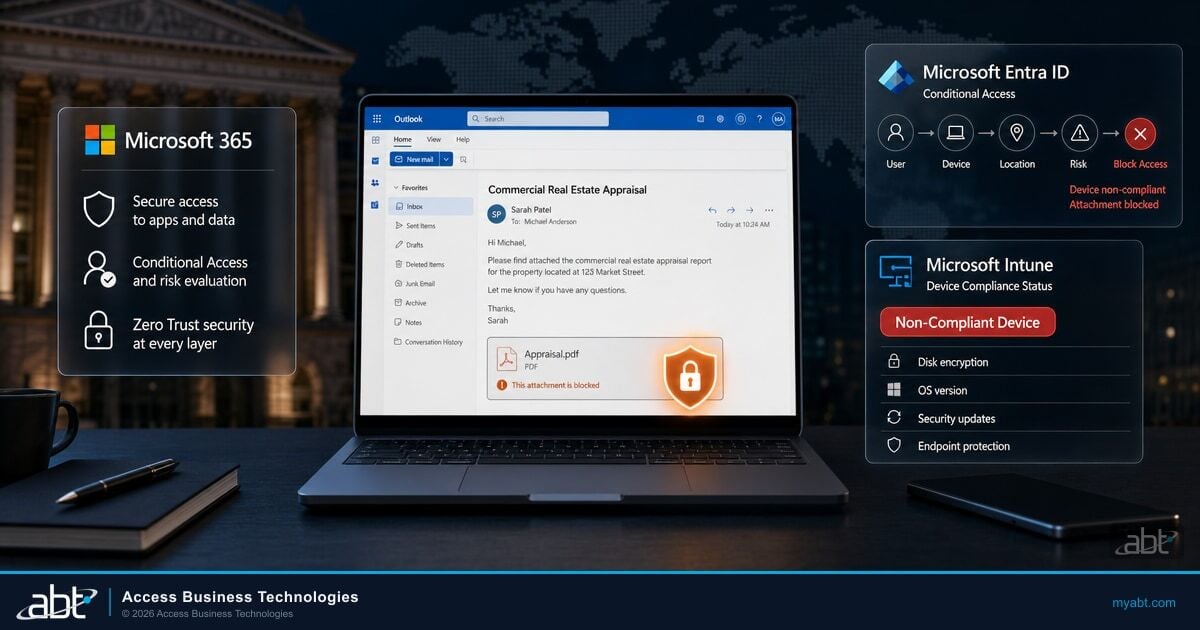
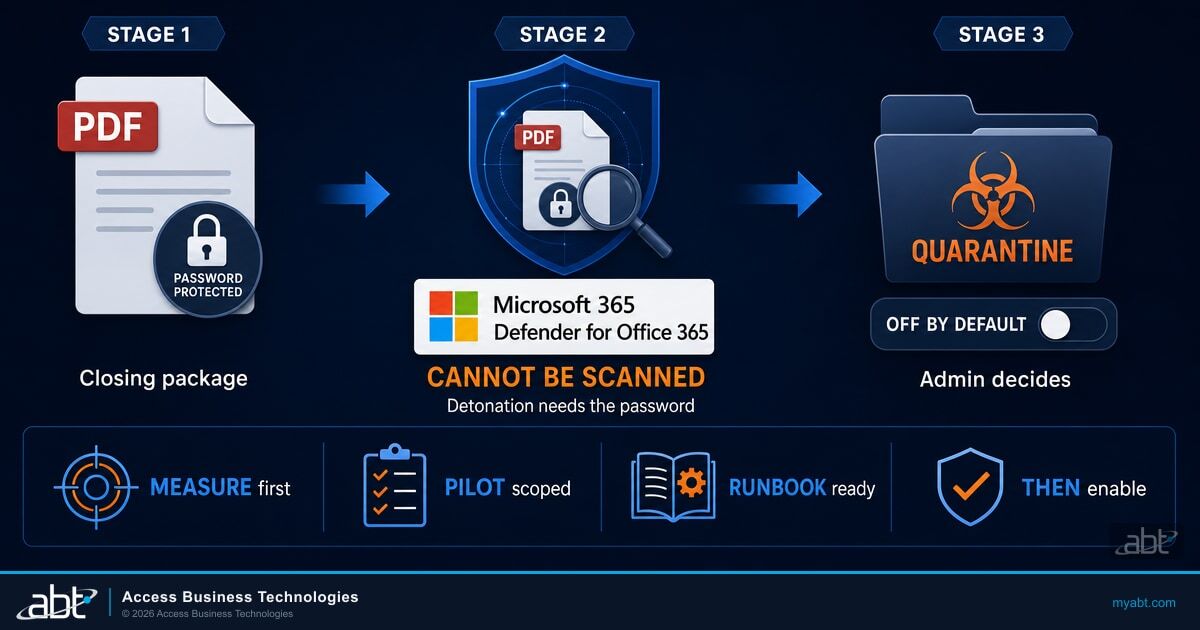
Microsoft is adding a setting to Microsoft Defender for Office 365 that quarantines that message. Not because the attachment is malicious, but because Defender could not open it to find out. The company put it plainly in the change notice: when Defender for Office 365 "cannot obtain the attachment password during scanning or detonation, the content cannot be fully analyzed for threats." The new option lets an administrator decide that unanalyzed is close enough to unwanted.
Here is the part that determines what you should do with this article. The setting is off by default, and it stays off until an administrator turns it on. Microsoft's own guidance in the notice is that no action is required unless you want to use the capability. So this is not a change arriving in your tenant and doing something to your mail. It is a decision arriving on your desk, with a rollout window that opens this month, and the institutions that handle it well will be the ones that treated it as a decision instead of a default.
What Microsoft Actually Changed, and What It Did Not
Safe Attachments is the layer of Defender for Office 365 that opens an email attachment in an isolated virtual environment and watches what it does before the message reaches the recipient. Microsoft calls that detonation, and documents it as an additional layer on top of attachments that ordinary anti-malware protection has already scanned. In practice that second layer is where a targeted attack gets caught, because a file built for one recipient has no signature to match.
Detonation has one structural limit, and it is not subtle: you cannot detonate a file you cannot open. A password-protected archive or an encrypted PDF arrives as a sealed box. The scanner sees the box, not the contents. Until now, Safe Attachments delivered that box, because the alternative was blocking mail on the basis of a verdict it never actually reached.
The new opt-in setting inside Safe Attachments policies changes that calculus. When Defender for Office 365 cannot complete scanning or detonation because the attachment is password protected, an administrator can now have the message quarantined rather than delivered. Microsoft currently lists the covered formats as including ZIP, GZIP, 7z, RAR, PDF and Microsoft Office file formats, and selected categories can be excluded from protection, which turns out to matter a great deal in the next section.
What This Change Does Not Do
It does not treat encryption as evidence of bad intent. A password-protected file is not reclassified as malicious, and nothing here says protected attachments are a threat by nature. The trigger is an unfinished scan, not a verdict.
It does not stop business email compromise, wire fraud or invoice manipulation. Those attacks usually carry no attachment at all. This setting addresses one narrow gap in one delivery path.
It does not change how Defender handles attachments it did scan and found malicious. That path, and the quarantine rules that go with it, are untouched.
The rollout is availability, not enforcement. These are the dates the setting shows up as something an administrator can switch on, and nothing in the schedule turns anything on by itself.
| Cloud | Availability window | What happens on these dates |
|---|---|---|
| Worldwide | Early August 2026 through late August 2026 | The setting becomes available. Nothing changes in your mail flow. |
| GCC | Late August 2026 through late September 2026 | Same. Availability only. |
| GCC High | Late August 2026 through late October 2026 | Same. Availability only. |
| DoD | Late August 2026 through late October 2026 | Same. Availability only. |
Hold onto that distinction. Most Microsoft 365 change notices that reach a compliance calendar are the other kind, where a date arrives and behavior changes whether anyone read the notice or not. The pressure here is not a deadline. It is that a control you could have turned on is a control an examiner can eventually ask about, and "we never looked at it" is a worse answer than "we looked, measured, and decided not to yet."

Why This Lands Differently in a Lending Shop
Read that format list again with a mortgage operation in mind. PDF. Microsoft Office formats. ZIP and its cousins, which is what everything becomes once somebody bundles it. That is not an edge case in lending. That is the loan file.
Appraisals arrive as protected PDFs. Closing packages arrive as protected PDFs. Title companies, settlement agents, insurance carriers, payroll processors verifying income, and correspondent partners all send documents that way, and many of them send them that way because someone in compliance told them to. Borrowers do it because their bank's secure portal told them to. The encryption is not an anomaly in the workflow. In a lot of shops it is the workflow, and it has been for fifteen years.
This is where a change that looks minor in a Microsoft release note stops being minor. Managing Microsoft 365 for financial institutions is most of what ABT does, and the pattern we see is that generic security guidance and lending operations collide precisely here, over documents that a bank is required to protect and required to receive from parties it does not control. A recommendation written for a software company does not survive contact with a funding date.
Turn this setting on across the whole tenant on a Tuesday and Wednesday is interesting. The volume of quarantined mail will not be a handful of suspicious archives. It will be a meaningful slice of ordinary business correspondence, and a share of it will be time-critical in a way that most quarantined mail is not.
A settlement agent sends the final closing package at 8:40 on the morning of a funding date. It is a password-protected PDF, as it has been on every file this agent has ever sent. The tenant-wide policy went live overnight.
The message is quarantined. The processor does not see a bounce, because that is not how quarantine works, and the sender does not get an error. Both sides assume the mail arrived. The gap is discovered when somebody picks up the phone, and by then the morning is gone.
None of that makes the setting wrong. It makes an unmeasured, untuned, tenant-wide enablement wrong, which is a different claim and a fixable one.
The case for eventually turning it on is just as real, and it is worth stating without hedging. The sealed box that no scanner can open is precisely the delivery method an attacker picks when they know the recipient will open it anyway. In lending, the recipient always opens it anyway, because opening protected documents from outside parties is the literal job. Every argument for why this setting will be disruptive in your environment is simultaneously an argument for why an attacker would choose that envelope to reach you.
Those are complaint-based figures reported to the IC3 by victims nationwide across every industry, not a measure of any one institution's exposure and not a projection of yours. They are useful for one thing here: the transaction type this setting sits closest to is one where reported losses have risen in each of the last three years. The same report puts business email compromise at $3,046,598,558 across 24,768 complaints in 2025, which works out to roughly $123,000 per reported complaint when you divide the two published figures.
The policy set this setting joins is covered in our guide to the anti-phishing configuration examiners expect in Microsoft Defender for Office 365, and the operational groundwork is in our best practices for configuring Microsoft 365 email for mortgage offices.
The Release Prompt Is a Training Surface
Microsoft built two ways out. A security administrator can release a quarantined message without knowing the attachment password at all. A user can also self-release an eligible message by supplying the password, at which point a just-in-time detonation runs before the message is released. That is a thoughtful design. It means the file does eventually get analyzed, using the one piece of information only the recipient has.
It also means your staff are now asked to type a password into a security prompt.
Microsoft clearly saw the same thing, because the change notice ships with user guidance that reads like it was written by somebody who has watched a phishing simulation go badly.
Users should only enter the attachment password. Users should never enter account credentials, banking passwords, or unrelated passwords. Users should only release expected messages from validated senders. Unexpected protected email messages should be escalated to SecOps.
Read that as what it is. It is not an admission that the feature is unsafe, and nothing here suggests Microsoft got the design wrong. It is a vendor telling you, before you deploy, that this workflow creates a habit and that the habit has an edge. People who get used to entering a password to see a document will eventually be shown a convincing imitation of that prompt.
Any control that teaches staff to enter a password in order to see a document needs its own line in the security awareness program, on the day it goes live and not after the first near miss.
The same IC3 report counts phishing and spoofing as the single largest crime type by complaint volume, at 191,561 complaints in 2025. Our look at how attacker behavior shifted across Microsoft 365 in recent threat data covers where that pressure is moving.

Two things are worth pinning down before you enable anything, because both are easy to get wrong in a policy review. First, keep this quarantine reason mentally separate from the malware and phishing one. Microsoft's Safe Attachments documentation is explicit that users cannot release their own messages quarantined as malware or phishing by Safe Attachments and may only request release. That rule is unchanged. This new quarantine reason is "could not be scanned," which is a different thing, and it is what the self-release path applies to. Do not let a policy conversation blur the two.
Second, whether user self-release can be restricted, narrowed, or routed entirely to your security team is a quarantine policy question, and it is the first thing to confirm in your own tenant when the setting appears. For some institutions the answer will decide whether this ships at all. We would rather flag it as the question to ask than tell you what the answer will be in your configuration.
Get the Number Before You Get the Opinion
Every conversation about this setting turns into a debate about whether the disruption is worth it, and every one of those debates is unresolvable, because nobody in the room knows the number. How much password-protected mail does your institution actually receive in a week? Almost no one can answer that, which is the real reason the argument goes in circles.
Microsoft published the query, and it is two lines.
The Advanced Hunting query, as published by Microsoft
EmailAttachmentInfo| where AdditionalFields contains "IsPasswordProtectedItem"
Run it in Advanced Hunting in the Microsoft Defender portal. One piece of advice that is ours rather than Microsoft's: widen the time range to thirty days before you draw any conclusion from it, because a seven-day window in lending tells you about one week of closings and very little else.
The volume tells you the size of the operational problem. Thirty messages a week and this is a small change with a short pilot. Three hundred a week and you are designing a process, briefing a help desk, and staging the rollout by department.
The senders tell you which counterparties matter. In a lending operation the traffic usually concentrates in a short list of title companies, settlement agents, carriers and vendors, and your own result will tell you whether that holds true for you. That list is the input to your exclusion and allow decisions, and it is worth building deliberately rather than discovering it from tickets.
The recipients tell you where to pilot. If protected attachments cluster in processing and closing, then those are the teams that will feel this, and they are also the teams whose feedback will tell you whether the release workflow is usable by people who are busy.
The one thing to do this month
Run the hunting query and write down three numbers: how many password-protected attachments arrived in the last thirty days, which ten senders account for most of them, and which teams receive them. That takes an afternoon, it commits you to nothing, and no decision about this setting is a real decision until those numbers exist.
Piloting It Without Stopping a Closing
Microsoft notes that organizations can pilot this using a separate scoped Safe Attachments policy, which is the right shape for the rollout and works in your favor here. Safe Attachments policies are already scoped by users, groups and domains with a priority order, so a pilot is a normal policy operation rather than a special project.
Run the hunting query. Establish volume, top senders and the receiving teams before anything is enabled.
Create a separate Safe Attachments policy covering one team that sees real protected-attachment traffic but is not on a closing-day critical path.
Write the release process, the escalation path and the help desk script before the policy is live, not after the first ticket.
Extend department by department, using category exclusions where the measured traffic justifies them, and document what you excluded and why.
Brief the help desk before the policy is live, not on the morning it is. The first symptom your institution will experience is not a security alert. It is somebody saying an email never arrived, and the person who takes that call needs to already know that quarantine is now a possible answer. Otherwise the first few hours go to troubleshooting mail flow that is working exactly as configured.
Tell your counterparties. The short list of senders from the hunting query is a list of firms you have a working relationship with. A note to a title company saying your bank is tightening how it handles protected attachments is a normal, professional conversation, and in some cases it opens the better conversation about not sending them that way at all.
Keep the decision record. Whether you enable this, pilot it, or measure it and defer, the artifact worth having is a short written note of what you measured, what you decided and why. That is the same discipline that makes email authentication defensible, which we covered in our guide to SPF, DKIM and DMARC for financial institutions, and it costs almost nothing at the time and a great deal to reconstruct two years later.
The detail worth noticing is that Microsoft shipped the measurement query in the same notice as the feature. Change notices usually describe what is arriving and leave you to work out the impact. This one hands administrators the hunting query up front, which reads as an acknowledgment that the blast radius is environment-specific and that Microsoft expects it to vary widely between tenants.
It will vary, and the reason is structural rather than technical. Across the Microsoft 365 tenants ABT manages for more than 750 financial institutions, the thing that drives protected-attachment volume is how an institution is shaped: how much of its document flow comes from outside counterparties it does not control. A commercial bank and a mortgage company running a heavy correspondent channel are not in the same conversation about this setting, and a credit union with a small mortgage desk is in a third one. Read your own result against how your loan files actually move, not against a benchmark from a different kind of institution.
The Longer Answer: Stop Mailing the Key With the Lock
A password-protected attachment is a weak control in most of the ways it actually gets used. The password frequently travels in the same thread as the file, or in a follow-up from the same compromised mailbox, or it follows a convention that anyone who has handled two loans from that counterparty can guess. It defeats your scanner reliably. It defeats a motivated attacker who has already read the mailbox rather less reliably, which is the inverse of what you want from a security control.
So the honest reading is that Microsoft is closing a real gap created by a practice that was never as protective as it felt. Closing it is reasonable. The practice is the deeper issue.
The durable fix is to move sensitive documents out of email attachments and into a channel built for them, where access is tied to identity rather than to a shared secret, permissions can be revoked after the fact, and there is an audit trail showing who opened what and when. When documents move that way, this entire decision shrinks, because the mail that would have been quarantined stops being sent.
That is the job MortgageExchange does for lenders. It moves loan documents between an institution and its counterparties as a governed exchange rather than as mail with a shared password on it, which is why the institutions running it are the ones for whom this month's Defender question is small. DocumentGuardian covers the same ground inside the institution, where controlled handling and retention matter as much as delivery. The underlying principle, and what it looks like day to day for a distributed team, is in our guidance on document security for remote mortgage teams.
Be clear-eyed about the timeline. This is a program, not a toggle, and it moves at the speed of counterparty adoption rather than internal configuration. The useful move is not to wait for it before deciding on the Defender setting. It is to run the hunting query once and read the sender list as two lists: the counterparties worth moving onto a real exchange, and the ones you will be receiving protected attachments from for the foreseeable future. The second list is what you are actually configuring Defender for.
What ABT Does About This
Everything this article has asked you to do is work your team can do, and we would rather you run it yourself this month than not run it at all. What follows is not a bid to take those tasks off you. It is the three things that sit around them, which are harder to do well from inside a single institution.
ABT manages Microsoft 365 tenants for more than 750 credit unions, banks and mortgage companies as a Tier-1 Microsoft Cloud Solution Provider. Microsoft owns and runs the underlying service. We administer the tenant under delegated admin, which means the Defender for Office 365 policy set this setting lives in is a surface we work in directly rather than advise about from outside. That managed operating model is what we call M365 Guardian, and these are the three parts of it that bear on this decision.
Reading the number, not just producing it. The query returns a count. What it does not tell you is whether that count is normal for an institution shaped like yours, and that is the part that decides what you do next. A number that would be unremarkable at a mortgage company running a correspondent channel can be a sign of something misrouted at a commercial bank of the same headcount. Interpreting it means knowing how loan files, deposit operations and vendor traffic actually move through a financial institution, which is the work we have been doing since 1999 and the reason we can tell you which of your senders should not be sending you protected attachments at all.
The whole policy surface, not one row of it. This setting is one option inside one policy inside a stack that also includes anti-malware, anti-phishing, Safe Links, quarantine policies and the preset security policies that silently apply to everyone not covered by a custom rule. The failure mode we see most often is not a wrong toggle. It is a policy set assembled one urgent decision at a time over six years, where nobody can say which rule actually applies to the closing department. Evaluating this change against what is genuinely configured today is different work from evaluating it against the documentation.
Drift, which is the one that actually bites. Security policy sets decay quietly. Someone adds a category exclusion during a bad week to get one closing through, the closing funds, and the exclusion is still there two years later because removing it was nobody's Tuesday. Catching that is a monitoring function with a memory, not a project, and it is the reason a configuration review has a short half life while a managed tenant does not.
What we are not going to tell you is that a setting stops wire fraud, or that any single control makes an institution safe. This one closes a specific gap in a specific delivery path, and it does that in exchange for operational friction that only your own measurements can size. The value is in making that trade deliberately, with the numbers in front of you, and then in the far less glamorous work of making sure the decision is still true next year.
See where this setting lands in your Microsoft 365 tenant, with M365 Guardian
We will run the measurement against your tenant, read the result against how your loan files actually move, and review your whole Defender for Office 365 policy set rather than the one option this article is about. You get a written recommendation either way, including the recommendation to wait, in a form you can hand to an examiner.
Frequently Asked Questions
No. Microsoft states that the feature is off by default and requires administrator opt-in, and that no action is required unless you want to use the capability. The published rollout windows are the dates the setting becomes available to configure, not dates on which anything changes in your mail flow.
Microsoft currently lists the supported file categories as including ZIP, GZIP, 7z, RAR, PDF and Microsoft Office file formats, and notes that selected categories can be excluded from protection. Treat that as the current published list rather than a fixed security boundary, and confirm the categories in your own tenant when the setting appears.
For this quarantine reason, Microsoft says users can self-release eligible messages by providing the attachment password, and a just-in-time detonation runs before the message is released. Security administrators can release without the password. This is separate from messages quarantined as malware or phishing by Safe Attachments, where Microsoft documentation states users cannot release their own messages and may only request release.
Microsoft published an Advanced Hunting query for exactly this, which queries the EmailAttachmentInfo table where AdditionalFields contains IsPasswordProtectedItem. Run it in the Defender portal across the last thirty days and record three things: total volume, the senders who account for most of it, and which internal teams receive it. Those three numbers are what turn this from a debate into a decision.
Not directly, and it would be a mistake to position it that way internally. Business email compromise and wire fraud typically involve no attachment at all, relying on a convincing message from a compromised or spoofed mailbox. This setting addresses one narrow gap, which is content that reached a recipient without ever being analyzed. It belongs in a layered configuration alongside anti-phishing policies, email authentication and payment verification controls, not as a substitute for any of them.
Microsoft's own guidance is a good starting script: enter only the attachment password, never account credentials or banking passwords or unrelated passwords, release only expected messages from validated senders, and escalate unexpected protected messages to the security team. Add that to security awareness training before the policy goes live, because any prompt that asks staff for a password is a prompt an attacker will eventually imitate.