In This Article
- What Microsoft Disclosed in CVE-2026-54130
- Why "Nothing to Patch" Is the Detail That Matters Most
- The Real Exposure Is Your Data, Not the CVE
- The Copilot Data-Access Governance Review
- What Examiners Will Ask Your Institution
- How ABT's Guardian Operating Model Runs the Review for You
- Frequently Asked Questions
A new critical-rated vulnerability landed in Microsoft 365 Copilot, and the shape of it is the part worth your attention. CVE-2026-54130 is what Microsoft calls "missing authentication for a critical function," which is the plain-English description of a flaw that let an attacker with no password, no stolen credential, and no user on the other end pull information out of the service over a network.
Then comes the part that surprises most security teams: there is nothing for your institution to patch. Microsoft fixed CVE-2026-54130 inside its own cloud, and no update, build, or admin-center toggle is waiting for your team to deploy. For a bank, credit union, or mortgage company, that combination feels contradictory. A critical-rated flaw with no action item? The instinct is to file it under "Microsoft handled it" and move on.
That instinct is the actual risk. CVE-2026-54130 is a reminder that you cannot patch your way out of a platform you do not control, and that the part of Copilot's risk you do control has nothing to do with this CVE and everything to do with how much of your data Copilot can reach on any ordinary day. This article separates the two cleanly: what Microsoft fixed, and what your institution still owns. The second list is the one that shows up on your next examination.
What Microsoft Disclosed in CVE-2026-54130
Microsoft disclosed CVE-2026-54130 on June 18, 2026. The affected product is Microsoft 365 Copilot, and the weakness type Microsoft assigns is CWE-306, missing authentication for a critical function. In practice that means a function the service should have gated behind authentication was reachable without it, and reaching it let an unauthorized party disclose information over a network.
The severity score is where the public record is still settling. Third-party vulnerability trackers have rated CVE-2026-54130 at the critical end of the scale, as high as CVSS 9.8, while the National Vulnerability Database had not yet published its own analysis as of late June 2026. Exact scores for a fresh cloud-service flaw often move as the authoritative sources finish their assessments. What is not in dispute is the shape of the flaw, and the shape is what should worry you: it is reachable across a network, by an attacker with no credentials, with no user in the loop. A missing-authentication information-disclosure flaw that an unauthenticated party can trigger remotely is serious no matter where the final number lands.
Two facts keep this from being a fire drill. First, Microsoft reports no evidence of exploitation in the wild, the vulnerability was not publicly disclosed before Microsoft addressed it, and it does not appear on the Cybersecurity and Infrastructure Security Agency's Known Exploited Vulnerabilities catalog. Second, the fix is already in place. Microsoft Copilot runs as a cloud service that Microsoft operates, so the Microsoft Security Response Center handles a flaw like this the way it handles any cloud-service issue: it remediates inside its own infrastructure and publishes the result.
Read the CVE in Two Columns, Not One
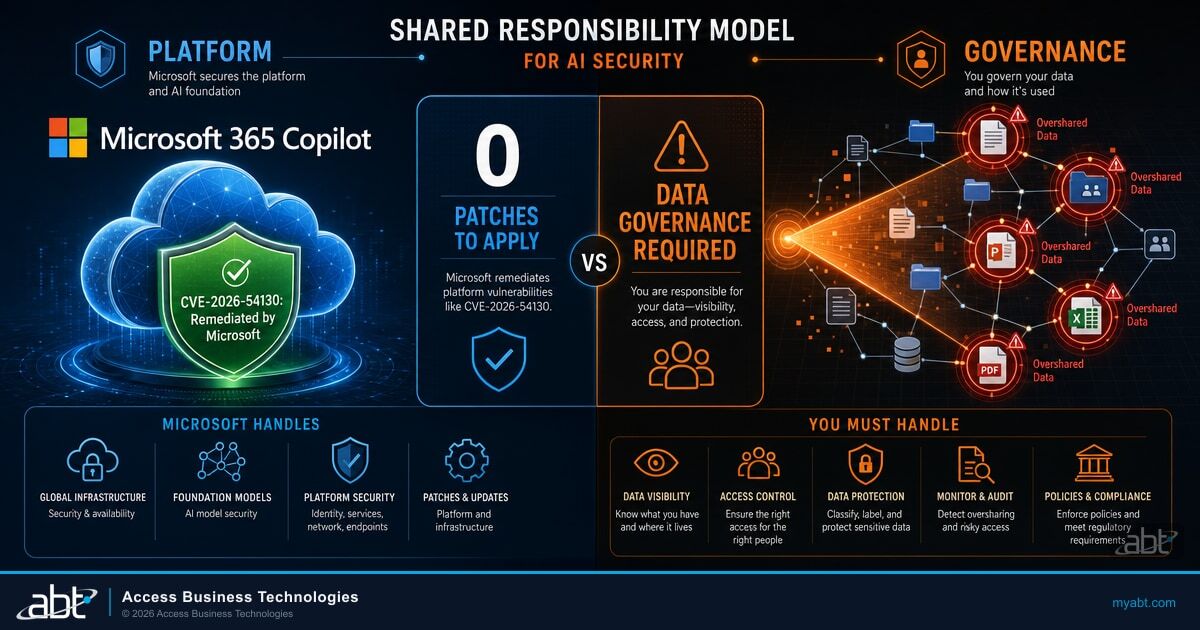
The mistake is reading CVE-2026-54130 as a single event with a single owner. It is two things at once. Microsoft owns the platform flaw and has already fixed it; your institution owns the data Copilot can see, and that ownership does not change when Microsoft patches a CVE. "Microsoft fixed this specific vulnerability" and "your tenant's Copilot data-access posture is still your responsibility" are both true, and the second sentence is the one that survives this CVE and applies to the next one.
Why "Nothing to Patch" Is the Detail That Matters Most
When Microsoft fixes a flaw in software you install, you get a patch, you test it, and you deploy it on a clock. When Microsoft fixes a flaw in a service it hosts, the remediation happens on Microsoft's side and you get a notification. Microsoft's standard advisory terminology for this case is an "Exclusively Hosted Service" vulnerability: the fix lives entirely within Microsoft's cloud boundary, so there is no security update package, no build number to chase, and no toggle in your admin center. For CVE-2026-54130, the verification work most teams expect after a critical advisory simply does not exist.
That is genuinely good news, and it is also the trap. A patch is a satisfying action. It gives a security team a task, a ticket, and a close-out date. When there is no patch, the natural response is to treat the whole event as closed. But the absence of a customer patch does not mean the absence of customer risk. It means the risk lives somewhere a patch cannot reach: in the configuration choices that decide what Copilot is allowed to surface when someone asks it a question.
You cannot out-patch a platform you do not control. The next Copilot flaw is coming, and the only variable you actually own is how much of your data it can reach when it arrives.
This is why CVE-2026-54130 is worth a meeting even though it is not worth a change ticket. It is the clearest possible illustration of the shared-responsibility line that runs through every cloud service. Microsoft secures the service. You secure your data inside it. When a Copilot platform flaw appears, the blast radius is not set by the severity of the flaw. It is set by how much sensitive data your institution has left reachable. An institution with tight, least-privilege data access has a small blast radius no matter how severe the next CVE is. An institution with sprawling, over-permissioned access has a large one.
| Responsibility | Microsoft owns it | Your institution owns it |
|---|---|---|
| The Copilot service code and platform | Yes. Microsoft patched CVE-2026-54130 server-side. | No action available or required. |
| Which data Copilot can reach | No. | Yes. Set by your permissions, sharing links, and labels. |
| Whether sensitive files are over-shared | No. | Yes. This is the exposure surface when any platform flaw appears. |
| Monitoring of Copilot data access | Provides the tooling (Purview). | Yes. You configure and review it. |
| Evidence for examiners | No. | Yes. You produce the access-governance record. |
The Real Exposure Is Your Data, Not the CVE
Copilot does not have its own view of your data. It sees exactly what the person prompting it is already permitted to see, and it surfaces that content faster and more completely than a human ever would by clicking through folders. That design is the productivity win, and it is also the exposure. If a loan officer technically has access to a SharePoint site full of board minutes or a folder of unencrypted member records that nobody intended them to reach, Copilot will happily summarize it on request. The permission was always wrong. Copilot just makes the consequence instant.
The scale of that latent over-permission, which we cover step by step in our guide to fixing Microsoft 365 Copilot oversharing, is larger than most institutions assume. Concentric AI's Data Risk Report, which analyzed more than 550 million records, found that roughly 16 percent of business-critical data is over-shared, with an average of about 802,000 files at risk per organization. Most striking for a regulated institution: 83 percent of those at-risk files were over-shared internally, and much of the data carried no sensitivity label at all, so Copilot's output does not reliably inherit any protection from the source file.
A credit union runs an oversharing assessment for the first time before turning Copilot loose on its staff. The report flags a "Marketing" SharePoint site shared with "Everyone except external users" that, three reorganizations ago, became the dumping ground for spreadsheets containing member names, account numbers, and loan balances. No one remembers granting the access. Nobody has opened the files in two years. Copilot, asked the right question, would have read them in seconds.
The CVE was never the threat the credit union needed to worry about. The over-shared site was. Fixing it is a permissions and labeling exercise, not a patch, and it shrinks the blast radius for every future Copilot flaw at once. The assessment that surfaces it is the foundational governance step every institution should run before, not after, a Copilot rollout.
The exposure is not theoretical enough to ignore and not urgent enough to panic over, which is exactly why it gets deferred. Organizations feel it most when they try to move. A Gartner survey of 132 IT leaders reported in June 2025 found that oversharing concerns caused 40 percent of organizations to delay their Microsoft 365 Copilot rollout by three months or more. The data governance most institutions skipped is now the gating factor on the productivity they want. CVE-2026-54130 is a free reminder to do that work on your own schedule rather than on an attacker's.

The Copilot Data-Access Governance Review
The work that actually reduces your Copilot risk is a data-access governance review, and every tool it requires already ships inside Microsoft 365. There is nothing new to buy and nothing third-party to bolt on. The review has four moving parts, and a bank, credit union, or mortgage company can run all four with Microsoft-canonical tooling. Those same four parts are the program ABT runs as the Guardian operating model, which we return to at the end of this article.
The first part is least privilege in Microsoft Entra and the underlying file shares. Copilot inherits user permissions, so the single most effective control is making sure people can reach only the data their role requires. Stale group memberships, broad "Everyone" sharing links, and orphaned site access are where the over-permission lives. Tightening them shrinks Copilot's reach before you touch any Copilot-specific setting.
The second part is Restricted Content Discovery in SharePoint Advanced Management. This is the control built specifically for the Copilot oversharing problem. It lets you flag sensitive sites so their content is excluded from Copilot and organization-wide search even when the underlying permissions have not been fully cleaned up yet. It is the fast lever you pull on the sites you cannot fully remediate this week.
The third part is Microsoft Purview sensitivity labels and data loss prevention. Labels travel with the file and let you set rules about how labeled content is handled, and Purview's DLP policies extend to the prompts and responses flowing through Copilot. Labeling is the slower, more durable work, and it is what makes Copilot's output inherit the protections of the source data rather than stripping them away. Our guide to Microsoft Purview DLP for AI walks through the specific configurations for banks, credit unions, and mortgage companies.
Microsoft built dedicated controls for exactly this problem. Microsoft Purview Data Security Posture Management for AI gives you oversharing assessments and an activity view of what Copilot is actually touching, including which interactions reached sensitivity-labeled data. SharePoint Advanced Management adds Restricted Content Discovery and permission reporting. Microsoft Entra carries the least-privilege access model underneath all of it. Banks, credit unions, and mortgage companies running Microsoft 365 already have most of these capabilities provisioned with their existing licensing. The gap is almost never the tooling. It is the time and the operating discipline to run it as an ongoing program.
The fourth part is monitoring, and it is the one that turns a one-time cleanup into a defensible posture. Microsoft Purview Data Security Posture Management for AI shows Copilot and agent activity, flags interactions that touched sensitive content, and gives you a rolling view of what your AI is reading. Standing that up means that when the next platform flaw appears, your team has a baseline to compare against, and your audit committee has a report rather than a shrug.

Run those four together and the question stops being whether Microsoft will ship another Copilot flaw. It becomes how little of your data the next one can reach, which is a question you control the answer to.
Not on Copilot yet? The review still matters, and the timing is better
If your institution has not turned on Microsoft 365 Copilot, CVE-2026-54130 does not put you at risk today. But the oversharing it points to is already sitting in your tenant, and it is the exact reason 40 percent of organizations stall their Copilot rollout. Running the data-access governance review before you deploy Copilot is faster and cheaper than running it under pressure after a pilot surfaces a problem. The institutions that govern access first get to say yes to Copilot with confidence instead of discovering their exposure live.
What Examiners Will Ask Your Institution
The governance review is not only a security exercise. It is increasingly an examination exercise. Federal and state examiners have moved past "do you use AI" to "show us how you govern it," and access control is the spine of that conversation. The GLBA Safeguards framework that applies to banks and credit unions, and the FTC Safeguards Rule that applies to many non-bank mortgage companies, both require institutions to limit access to customer information to authorized users and to monitor that access. Copilot does not change that requirement. It raises the stakes of getting it wrong, because Copilot makes over-permission instantly exploitable by anyone who can prompt it.
An examiner who asks about your Copilot deployment is really asking whether you can demonstrate control over what it can reach. A clean answer has four parts: a least-privilege access model you can show, a list of restricted sites Copilot is blocked from, a labeling and DLP posture for sensitive data, and a monitoring record of Copilot activity. Each of those is a Microsoft 365 artifact you can put in front of an examiner. An institution that has run the governance review can produce all four in an afternoon. An institution that has not will be improvising in the room. Our breakdown of the five Microsoft 365 controls examiners ask about maps each one to the evidence an examination expects.
The Governance Review in One Read
Least privilege: Use Microsoft Entra and file-share permissions so people, and therefore Copilot, can reach only what their role requires.
Restrict: Use Restricted Content Discovery in SharePoint Advanced Management to block Copilot from sensitive sites you cannot fully remediate yet.
Label and protect: Use Microsoft Purview sensitivity labels and DLP so protection travels with the data into Copilot's output.
Monitor and prove: Use Microsoft Purview Data Security Posture Management for AI to watch Copilot access and produce the evidence examiners want.
How ABT's Guardian Operating Model Runs the Review for You
The review is straightforward to describe and genuinely time-consuming to run, especially the first time, against a tenant where permissions have accumulated for years. Most institutions do not have a spare team to add a standing Copilot data-governance program to the backlog. That gap is where ABT's Guardian operating model fits.
Guardian is how ABT manages Microsoft 365 tenants for more than 750 banks, credit unions, and mortgage companies. As a Tier 1 Microsoft Cloud Solution Provider, ABT manages the tenant through delegated administrator permissions: Microsoft hosts the infrastructure and the Copilot service, and ABT applies the configuration, runs the least-privilege and labeling work, stands up the Purview monitoring, and turns advisories like CVE-2026-54130 into action that lands inside your tenant without your team having to drive it. When the next Copilot platform flaw appears, the work that contains its blast radius is already done.
For institutions running Microsoft 365 outside Guardian, the governance review is achievable in-house, and the Microsoft Learn documentation referenced throughout this article is the place to start. The harder part is rarely the first run. It is keeping the access model clean as permissions drift, and standing ready for the next platform flaw every time it lands. Running the review once is a project. Running it on that cadence is a program, and that program is what Guardian is. Whether your team runs it directly or ABT runs it as a managed service, the outcome examiners and audit committees want is identical: a least-privilege access model, restricted sensitive content, labeled and protected data, and a monitoring record. CVE-2026-54130 is the prompt to make sure that outcome exists before the next vulnerability tests it.
For related reading, our analysis of whether Microsoft Copilot is safe from prompt injection covers a different angle on the same data-exposure question, and the Copilot governance dashboard guide shows how to monitor AI usage across your tenant on an ongoing basis.
Want to know your Copilot blast radius before the next CVE finds it?
Talk to an ABT expert about a Copilot data-access governance review on your Microsoft 365 tenant. We manage Microsoft 365 for more than 750 banks, credit unions, and mortgage companies, and we built the Guardian operating model around exactly this kind of question. Start with a free Security Grade to see where your hardening gaps sit.
Frequently Asked Questions
No. CVE-2026-54130 affects Microsoft 365 Copilot, which runs as a cloud service Microsoft operates. Microsoft handles it as what its advisories call an Exclusively Hosted Service vulnerability, meaning Microsoft remediated it inside its own cloud and there is no security update, build, or admin-center toggle for your team to apply. The work that remains is governance work: review and tighten how much of your data Copilot can reach, because that, not this specific CVE, is the part your institution controls.
Vulnerability trackers have rated CVE-2026-54130 at the critical end of the scale, as high as CVSS 9.8, while the National Vulnerability Database's own analysis was still pending as of late June 2026. The score may settle lower as authoritative sources finish their assessments, but the shape of the flaw is what matters: it is reachable over a network by an unauthenticated attacker with no user interaction. On the urgency side, Microsoft reports no evidence of exploitation in the wild, the vulnerability was not publicly disclosed before Microsoft addressed it, and it is not listed on CISA's Known Exploited Vulnerabilities catalog. Treat it as a governance wake-up call rather than an emergency.
Run a Copilot data-access governance review using the tooling already in Microsoft 365. There are four parts: enforce least privilege in Microsoft Entra and your file shares so users and Copilot reach only what a role requires; use Restricted Content Discovery in SharePoint Advanced Management to block Copilot from sensitive sites; apply Microsoft Purview sensitivity labels and data loss prevention so protection travels with the data; and turn on Microsoft Purview Data Security Posture Management for AI to monitor and document Copilot activity. Together these shrink the blast radius of this CVE and every future one.
Copilot surfaces whatever the person prompting it already has permission to see, and it does so instantly and comprehensively. Concentric AI's Data Risk Report, analyzing more than 550 million records, found about 16 percent of business-critical data is over-shared, averaging roughly 802,000 files at risk per organization, with 83 percent of those files over-shared internally and much of it unlabeled. For a regulated institution, that means member or borrower data sitting in sites that more staff can reach than should, which Copilot can summarize on request. Tightening that access is the single most effective Copilot risk reduction available.
Examiners are moving from "do you use AI" to "show us how you govern it." The GLBA Safeguards framework for banks and credit unions and the FTC Safeguards Rule for many non-bank mortgage companies both require limiting access to customer information to authorized users and monitoring that access. For Copilot specifically, a clean answer demonstrates four things: a least-privilege access model, a list of sites restricted from Copilot, a sensitivity-labeling and DLP posture, and a monitoring record of Copilot activity. Each is a Microsoft 365 artifact you can produce from Purview, Entra, and SharePoint Advanced Management.
ABT is a Tier 1 Microsoft Cloud Solution Provider that manages Microsoft 365 for more than 750 banks, credit unions, and mortgage companies. Through the Guardian operating model, ABT runs the data-access governance review as standard practice: enforcing least privilege, configuring Restricted Content Discovery, applying Purview sensitivity labels and DLP, and standing up Purview Data Security Posture Management for AI monitoring. Microsoft hosts the infrastructure and the Copilot service; ABT manages the tenant and the governance on top of it. When a CVE like CVE-2026-54130 appears, the blast-radius work is already done, and the customer receives a confirmation rather than a fire drill.