In This Article
Somewhere in your institution there is a spreadsheet. It gets emailed to branch managers and department heads twice a year, it lists everyone with access to something, and it comes back with most of the boxes ticked yes because reading 400 rows carefully is nobody's actual job. Then it gets filed, and it becomes your evidence that access is reviewed.
That spreadsheet is expensive in a way that never shows up on a budget line. It burns days of manager time across the institution, it produces a document nobody trusts, and it leaves the real question unanswered: does the loan processor who moved to servicing eighteen months ago still have the old permissions? Usually, yes.
Microsoft Entra ID has a feature built for exactly this. Access reviews turn the recertification exercise into a recurring, self-service workflow where the people who actually know the answer get asked a short question, and the decisions apply themselves. The capability is genuinely good. The part that surprises credit unions, banks, and mortgage companies is what it costs to turn on, and the answer has almost nothing to do with how many people run the reviews.
What Entra access reviews actually do
An access review is a scheduled question sent to a human who can answer it. You pick a thing that grants access, a group, an application, an administrative role. You pick who should vouch for it. Entra sends them a list, they approve or deny each person, and when the review closes the decisions can apply automatically.
The reviewer experience matters more than it sounds. In the spreadsheet model, a department head is handed a list of usernames and asked to make judgments with no context. In Entra, reviewers work in a portal that shows them who each person is, when they last signed in, and a recommendation. That difference is why reviews that used to get rubber-stamped start producing real removals.
What counts as an access review
Not every access check is a review. Provisioning decides who gets access on day one. Offboarding removes it on the last day. An access review is the recurring question in between: of the people who already have this access, who should still have it? That gap is where permissions quietly accumulate, and it is the gap examiners keep finding.
Reviews can run on a schedule. Microsoft's documentation describes recurring reviews at set frequencies including weekly, monthly, quarterly, or annually, with reviewers notified at the start of each cycle. That scheduling is what turns a project into a control, because a control that only runs when somebody remembers to run it is not a control.
This is a different job from removing standing administrative privilege, which is what just-in-time admin through Privileged Identity Management handles, and a different job again from cutting off access when somebody leaves. Those two are well understood. Periodic recertification of the access people already hold is the one that tends to be running on a spreadsheet.
What your examiner actually asks for
The regulatory expectation here is unusually specific, and it is worth reading in the regulator's own words rather than a summary of them. The FFIEC IT Examination Handbook sets out what a user access program has to contain.
Ongoing reviews by business line and application owners to verify appropriate access based on job roles with changes reported on a timely basis to security administration personnel.
Periodic independent reviews that ensure effective administration of user access, both physical and logical.
Read those two lines together, because the structure is the point. The handbook asks for two different reviews performed by two different kinds of people. Business line and application owners verify that access matches job roles, since they are the only ones who know what a job role actually involves. Then a separate, independent review checks that the whole process is being administered properly. One layer is the work. The other layer is the check on the work.
The Logical Security section of the same booklet names periodic review as one of the three core processes of access administration, alongside enrolling new users and authorizing modifications, and it tells institutions to review access rights on a schedule commensurate with risk. For privileged access specifically it asks for review by an independent party at appropriate intervals.
Mortgage companies operating outside bank examination fall under the FTC Safeguards Rule instead, and the language lands in the same place. The rule requires implementing and periodically reviewing access controls that authenticate and permit access only to authorized users, and that limit authorized users' access only to the customer information they need to perform their duties and functions. We walk through the rest of that rule in our Safeguards Rule guide for mortgage lenders.
Nobody mandates quarterly
Quarterly reviews are common practice, not a cited requirement. The FFIEC handbook says access rights should be reviewed at a frequency commensurate with risk, and the Safeguards Rule says periodically. Neither names an interval. What examiners look for is a documented, risk-based rationale for the frequency you chose and evidence that you actually held to it. Picking quarterly because a vendor slide said quarterly is a weaker answer than picking annually for low-risk groups and monthly for privileged roles, and being able to explain why.
None of this obligates you to automate anything. An institution can satisfy these expectations with a well-run manual process and good documentation. The reason to automate is that the manual version drains senior time, produces evidence of uncertain quality, and quietly fails as headcount grows. Tooling is the efficient path here, not the required one, and any vendor telling you the regulation requires their product is overselling.
Microsoft draws the line to examiner findings itself. Its own guidance on access reviews states that excessive access rights can lead to compromises, and that excessive access rights can also lead to audit findings, because they indicate a lack of control over access. When the platform vendor and your regulator describe the same failure the same way, the gap is not a matter of interpretation.
The licensing math that catches most institutions
Here is where the planning usually goes wrong. The instinct is to license the people doing the reviewing, because they are the ones touching the feature. A department head and three managers run the reviews, so you budget four licenses. That is not how it is counted.
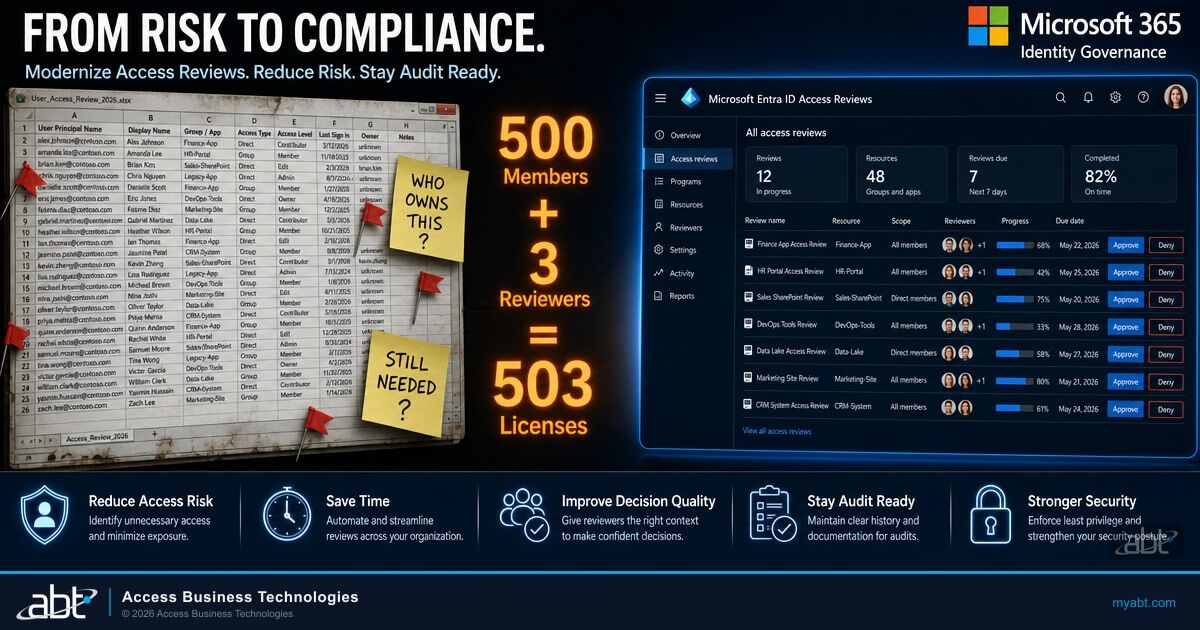
Microsoft publishes the scenarios directly. Reviewing a group of 75 members with a single group owner as reviewer is counted as 76 licenses, one for the owner and 75 for the members. Reviewing a 500-member group with three owners as reviewers is counted as 503. The population being reviewed carries the licensing, not the population doing the review.
Say a 900-employee bank plans quarterly reviews of its core banking and lending groups. Four department heads will act as reviewers, so the budget request covers four licenses and gets approved without much discussion.
Every employee whose access is being reviewed is counted too. If the reviews touch most of the workforce, the requirement is closer to the full employee population than to four. The gap surfaces at renewal or during a licensing true-up, long after the control was presented to the board as operational.
One nuance takes some of the sting out. Microsoft's documentation notes that the licenses do not have to be individually assigned to each person. What matters is that the tenant holds enough of them to cover everyone in scope of the feature. That is a meaningful administrative difference, though not a budgetary one.
The second half of the problem is which license you already own, and this is where most of ABT's client base finds an unwelcome surprise.
Microsoft 365 Business Premium or E3
- Includes Microsoft Entra ID P1
- No access review capability included
- Qualifies as the prerequisite for the Entra ID Governance add-on
- The examiner expectation applies anyway
Microsoft 365 E5
- Includes Microsoft Entra ID P2
- Core access review capability included
- Reviews of groups, applications, and roles
- Advanced review features sit outside P2
Entra ID Governance or Entra Suite
- Full access review feature set
- Reviews scoped to inactive users
- Machine learning assisted recommendations
- Lifecycle workflows and entitlement management
Most community banks, credit unions, and mortgage companies run Business Premium or E3. We can say that with some confidence because ABT manages Microsoft 365 tenants for more than 750 financial institutions, and that is overwhelmingly what they hold. Both SKUs include Entra ID P1, and access reviews are not part of P1. So the common starting position is an institution that owes its examiner a periodic access review process and owns no Entra tooling to perform it.
The upgrade path exists, since Business Premium and E3 both satisfy the prerequisite for adding Entra ID Governance, but it is a purchase decision rather than a switch you flip. This is the practical difference between a Tier-1 Microsoft Cloud Solution Provider and a general IT vendor. The questions in front of you are how many identities actually fall in scope once guests and service accounts are counted, whether the add-on or a broader SKU move is cheaper at your headcount, and what the number looks like at renewal rather than today. A partner who transacts Microsoft licensing directly can model that against your real tenant and put the add-on on your existing agreement. A partner who does not will tell you to call Microsoft.

There is also a directional signal worth factoring into any multi-year plan. Microsoft has stated that currently available features in the Entra ID P2 SKU will remain, but that no new identity governance and administration capabilities will be added to P2. The feature family's roadmap now runs through Entra ID Governance and the Entra Suite. An institution standardizing on P2 today is standardizing on a frozen feature set.
What you can review, and who should review it
Access reviews are not created in one place. Where you set one up depends on what you are reviewing, which trips people up the first time they go looking for the feature and cannot find the option they expected.
| What you are reviewing | Where the review is created | Who can be the reviewer |
|---|---|---|
| Security group and Microsoft 365 group membership | Access reviews, or Microsoft Entra groups | Chosen reviewers, group owners, or self-review |
| Users assigned to a connected application | Access reviews, or Entra enterprise apps | Chosen reviewers, or self-review |
| Microsoft Entra role assignments | Privileged Identity Management | Chosen reviewers, or self-review |
| Azure resource role assignments | Privileged Identity Management | Chosen reviewers, or self-review |
| Access package assignments | Entitlement management | Chosen reviewers, group members, or self-review |
The reviewer choice is the decision that determines whether the whole exercise is worth anything. Self-review, where each person confirms their own access, is the cheapest option and the weakest. It has a legitimate narrow use, confirming that someone still needs a tool they requested, but as the primary mechanism it recreates the rubber-stamp problem in a nicer interface. It also does not match what the FFIEC handbook describes, which is verification by business line and application owners.
Owner review is the model the handbook points at. The person accountable for a lending system confirms who should be in it. Pair that with a periodic independent review, which in practice means someone outside the business line, often internal audit or the information security function, checking that reviews are happening, that denials are being applied, and that owners are not approving everything on autopilot.
Privileged roles deserve their own treatment. Global Administrator and the other high-impact directory roles should be reviewed more often than a departmental group, by someone independent, and with a low tolerance for approvals that lack a stated reason. This is also the review most likely to surface accounts nobody can account for, including guests who were added for a project that ended two years ago.
Standing up your first review cycle
The failure pattern for a first deployment is trying to review everything at once. A tenant-wide review lands hundreds of decisions on people who have never seen the interface, they approve everything to clear the queue, and the resulting evidence is worse than the spreadsheet it replaced because now it carries the authority of a system.
Pick the highest-risk, smallest population first. Privileged directory roles and access to core systems, not every distribution group.
Confirm each group and application has a real, current owner. Ownerless resources are the most common blocker, and finding them is itself a useful finding.
Choose an interval per resource based on risk, and write down the reasoning. The rationale is the part an examiner asks about.
Decide in advance what happens to denied access and to reviewers who never respond, then run one cycle and check the results before widening scope.
Two configuration choices deserve deliberate thought rather than defaults. The first is what happens when a reviewer does not respond, because a policy of taking no action turns silence into permanent access, while a policy of removing access can lock people out of systems they need on a Monday morning. The second is whether decisions apply automatically. Auto-apply is what makes the control real, since a review that produces recommendations nobody implements has not removed any access at all.

Access sprawl also compounds in ways that are easy to miss until an AI assistant makes them visible. Broad group membership that nobody has recertified in years is the same underlying condition that drives Copilot oversharing, where a tool faithfully surfaces documents a user technically had permission to open all along. Running access reviews before a Copilot rollout is one of the best sequencing decisions available.
Reporting closes the loop. Review results give you something concrete for board and committee IT reporting: how many entitlements were reviewed, how many were removed, which resources had no owner, and where reviewers failed to respond. Those numbers are more useful to a board than an assertion that access is reviewed periodically, and they are the same numbers that make an FFIEC IT examination go smoothly.
All of this is achievable in-house, and plenty of institutions run it themselves. The constraint is rarely capability and almost always attention. Someone has to chase the reviewers who did not respond, confirm the denials actually applied, re-home the groups whose owner left in March, and produce the quarterly numbers in a form the board and the examiner both accept. That work does not fit into an existing role at a 200-person bank, which is why access reviews are the control most likely to be configured once and quietly stop running. Institutions that would rather not carry that load run it through the M365 Guardian operating model, where ABT manages the review cycles inside the tenant it already administers and hands over the evidence. Either way, the rhythm is the deliverable.
Where this breaks down
Three things go wrong often enough to plan around.
Ownerless resources. Groups created years ago by people who have left, with no owner recorded, cannot be routed to an owner reviewer. The review either falls to an administrator who lacks the context to judge it, or it does not happen. Cleaning up ownership is the unglamorous prerequisite, and it is usually the longest part of a first deployment.
Guests and external accounts. Guest identities accumulate from vendor projects, examinations, and integrations. They are exactly the population most worth reviewing and they carry a different licensing model, since Microsoft bills governance for guest users on a monthly active user basis, which requires an Azure subscription. Budget for it separately rather than discovering it mid-deployment.
Letting the license lapse. This one is quietly severe. If the underlying Entra ID P2 or Entra ID Governance licensing expires, ongoing access reviews of Entra roles end and Privileged Identity Management configuration settings are removed. Eligible role assignments go away, since users can no longer activate privileged roles. An institution that built its recertification evidence on this tooling and then let the subscription lapse loses both the control and the configuration behind it, at a moment nobody is watching for it.
Key Takeaway
Your examiner is asking for a two-layer review: owners verifying that access matches job roles, and an independent check that the process is being run properly. Microsoft Entra can carry both layers well. Before it can, confirm two things: that your tenant is licensed for the feature at all, since Business Premium and E3 include Entra ID P1 and access reviews are not in P1, and that the license count covers everyone whose access gets reviewed rather than the handful of people doing the reviewing.
The institutions that get this right treat it as an operating rhythm rather than a project. A small scope, real owners, a defensible frequency, decisions that actually apply, and a quarterly number to report. Whether your own team carries that or ABT carries it for you matters less than the fact that somebody is named and it happens on a schedule. That is a control. The spreadsheet was a ritual.
Find out what your tenant can actually do today
An ABT tenant review tells you where you stand before you commit to a licensing decision:
- Which Entra licenses your tenant holds, and what they include
- Which groups, applications, and privileged roles have no current owner
- How many identities would fall in scope of a review, including guests
- A risk-based review frequency you can document and defend
Frequently Asked Questions
Not necessarily, but you do need more than Business Premium or E3. Microsoft 365 E5 includes Microsoft Entra ID P2, which carries the core access review capability. Business Premium and E3 include Entra ID P1, which does not include access reviews. Institutions on Business Premium or E3 can add Microsoft Entra ID Governance, since both meet the prerequisite for that add-on. Microsoft also notes that the full access review feature set, including reviews scoped to inactive users and machine learning assisted recommendations, requires Entra ID Governance or the Entra Suite rather than P2 alone.
Enough to cover the people whose access is being reviewed, plus the reviewers. Microsoft's published example scenarios make this explicit: reviewing a 75-member group with one group owner as reviewer is counted as 76 licenses, and reviewing a 500-member group with three owners as reviewers is counted as 503. The licenses do not have to be individually assigned to each person, but the tenant needs to hold enough to cover everyone in scope of the feature. Budgeting only for the reviewers is the most common planning error.
The FFIEC does not name a fixed interval. The Information Security booklet says access rights should be reviewed at an appropriate frequency based on the risk to the application or system, and that management should review access rights on a schedule commensurate with risk. Quarterly is common practice rather than a requirement. What examiners look for is a documented risk-based rationale for the frequency you chose, and evidence that the reviews actually happened on that schedule.
Entra supports self-review, but it is a poor primary mechanism for a regulated institution. The FFIEC IT Examination Handbook describes ongoing reviews by business line and application owners, plus periodic independent reviews, which is a different model from asking each user to confirm their own access. Self-review has a narrow legitimate use, such as confirming somebody still needs a tool they requested. For anything tied to customer information or privileged roles, use owner review with an independent check on top.
You lose both the reviews and the configuration behind them. Microsoft states that when a Microsoft Entra ID P2 or Entra ID Governance license expires, ongoing access reviews of Microsoft Entra roles end and Privileged Identity Management configuration settings are removed. Eligible role assignments are also removed, because users can no longer activate privileged roles. For an institution presenting access recertification to its board and examiners as an operating control, a lapsed subscription quietly removes the control.
The wording differs, the substance does not. Non-bank mortgage lenders and brokers fall under the FTC Safeguards Rule, which requires implementing and periodically reviewing access controls that authenticate and permit access only to authorized users, and that limit authorized users' access only to the customer information they need to perform their duties and functions. That is the same periodic recertification expectation the FFIEC handbook sets for examined depository institutions, arriving through a different regulator.