In This Article
- What System Interfaces Do and Why They Break
- The Real Cost of Duplicate Data Entry in Financial Services
- How Interfaces Eliminate Redundant Entry Across Your Technology Stack
- Six High-Impact Interface Patterns for Financial Institutions
- System Modernization: Why API-First Architecture Matters Now
- Implementation Strategies That Survive Go-Live
- Common Interface Traps and How to Avoid Them
- Frequently Asked Questions
Your team keys the same client information into three different screens every day. The account number goes into the core banking system, the servicing platform, and the compliance reporting tool. A loan officer types borrower data into the LOS, then re-enters half of it into the CRM. A teller updates an address in one system and hopes someone remembers to change it in the other four.
This isn't a technology problem. It's an integration problem. Banks, credit unions, and mortgage companies run anywhere from 5 to 15 core applications that don't talk to each other out of the box. Each system was designed to do its job well. None of them were designed to share data with the others automatically.
Custom interfaces fix that. They connect your systems so data enters once and flows everywhere it needs to go without human re-entry, reformatting, or reconciliation. The question isn't whether your institution needs better integration. It's which connections will save the most time and eliminate the most risk.
What We Mean by "Interface"
In financial services IT, an interface is a programmatic connection between two systems that moves data automatically. It's different from a manual export/import, a screen scrape, or a middleware hub. A properly built interface handles data translation, error recovery, and bidirectional synchronization without staff involvement. ABT's MortgageExchange product is one example: it connects loan origination systems to core banking platforms so mortgage data flows without re-entry.
What System Interfaces Do and Why They Break
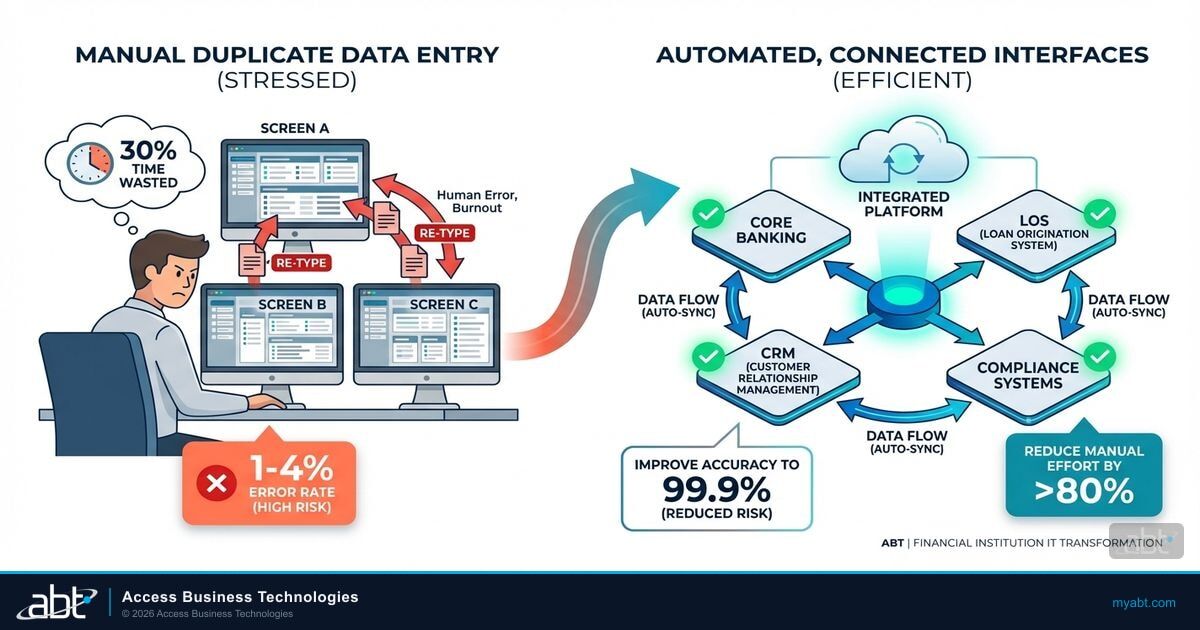
An interface connects two software systems so data flows without human re-entry. Your core banking platform stores account records. Your servicing system tracks payments. Your compliance tool generates regulatory reports. Your CRM manages client relationships. Without interfaces, your staff becomes the integration layer, manually copying data between each system.
Interfaces break for predictable reasons. A system vendor releases an update that changes the data format. A field that was required becomes optional, or vice versa. A connection that handled 100 transactions per hour suddenly needs to handle 500 after a merger. The original developer left and nobody documented the configuration. These aren't edge cases. They're the normal lifecycle of any system integration in a financial institution.
The Real Cost of Duplicate Data Entry in Financial Services
Duplicate data entry costs more than staff time. It costs accuracy, audit readiness, and client trust.
Error propagation. When the same data lives in multiple systems without synchronization, discrepancies are inevitable. An address updated in the CRM but not the core system means the next compliance mailing goes to the wrong location. A rate change entered in the LOS but not reflected in the servicing platform creates payment miscalculations. Each unsynchronized system multiplies the chance of an error reaching a client, a regulator, or a financial statement.
Examination exposure. NCUA examiners, OCC reviewers, and state regulators expect consistent records across your technology stack. When your loan file says one thing, your servicing system says another, and your compliance reports say a third, you're explaining data inconsistencies instead of demonstrating operational strength. Financial institutions that run integrated compliance workflows avoid this problem entirely.
Staff capacity drain. Every hour your team spends re-entering data is an hour they're not spending on client service, risk analysis, or process improvement. For a mid-sized credit union processing 200 loans per month, manual data entry across disconnected systems can consume 40-60 staff hours per week. That's a full-time employee doing nothing but copying and pasting between screens.
Manual Data Entry
- Same data typed into 3-5 systems per transaction
- 1-4% error rate on manual keystrokes
- No audit trail linking entries across systems
- Updates require touching every system individually
- Reconciliation done by spreadsheet at month-end
Interface-Driven Data Flow
- Data enters once at the source of truth
- Automated validation catches errors at entry
- Complete sync log for every data movement
- Changes propagate to all connected systems
- Continuous reconciliation, not monthly scrambles
How Interfaces Eliminate Redundant Entry Across Your Technology Stack
A well-designed interface does three things that manual processes can't match at scale.
Real-time synchronization. When a loan officer updates a borrower's income documentation in the LOS, that update flows to the credit analysis tool, the compliance checklist, and the CRM within seconds. When a teller corrects an account holder's phone number, every connected system reflects the change without a second keystroke.
Automated document population. Interfaces pull data from verification services, regulatory databases, and third-party providers to pre-fill forms and disclosures. Your team reviews and validates rather than typing from scratch. This shifts their role from data entry to quality review, which is exactly where you want your experienced staff spending their time.
Bidirectional data flow. A true interface isn't a one-way data push. Credit scores, property valuations, employment confirmations, and account balances flow in both directions between connected systems. Your core platform always has the most current information from every connected service, and those services always have the most current data from your core.
ABT Builds the Interfaces. You Stop Re-Entering Data.
750+ financial institutions trust ABT to connect their systems so data flows once and shows up everywhere.
Six High-Impact Interface Patterns for Financial Institutions
Not every interface delivers equal ROI. These six connection patterns produce the largest time savings and error reduction across banks, credit unions, and mortgage companies.
| Interface Pattern | Connects | Who Benefits Most | Typical Time Saved |
|---|---|---|---|
| Core-to-LOS | Core banking ↔ Loan origination | Credit unions, community banks | 15-25 min/loan |
| Verification Services | Income/employment/credit ↔ LOS or Core | All FIs with lending | Days → minutes per case |
| Document Management | Imaging system ↔ Core or LOS | High-volume operations | 5-10 min/file |
| Compliance Reporting | Core/LOS ↔ Regulatory reporting tools | All regulated FIs | Hours per reporting cycle |
| CRM Synchronization | CRM ↔ Core banking | Relationship-focused institutions | 10-15 min/update |
| Investor/Secondary Market | LOS ↔ Fannie/Freddie/Ginnie systems | Mortgage companies | 30-60 min/delivery |
Core-to-LOS integration is the highest-impact connection for credit unions and community banks that originate mortgages. When a member applies for a mortgage, their account history, deposit balances, and existing loan data should populate the loan file automatically from the core banking platform. ABT's MortgageExchange does exactly this for institutions running Symitar, FIS, or Fiserv core systems connected to Encompass, Byte, or other LOS platforms.
Verification services eliminate the manual phone calls, fax requests, and portal logins that consume processor time. Direct connections to The Work Number, credit bureaus, and automated valuation models deliver results into the loan or account file in minutes instead of days.
Document management integration ensures files uploaded in one location appear everywhere they're needed. Borrowers uploading documents through a portal don't create separate work queues that someone must reconcile by hand. This connection matters most for operations handling 100+ files per month.
Compliance reporting interfaces pull data directly from your core and LOS platforms into regulatory reporting tools. For mortgage operations, this means HMDA data flows automatically from loan records. For banks, BSA/AML transaction monitoring gets fed from the core system. For credit unions, call report data populates from the general ledger without manual extraction.

System Modernization: Why API-First Architecture Matters Now
The financial services industry is in the middle of a platform modernization wave. Core banking vendors are building API layers. LOS platforms are replacing legacy SDKs with modern integration frameworks. Regulatory technology providers are adopting standardized data exchange formats.
For mortgage operations specifically, ICE Mortgage Technology pushed the Encompass SDK sunset to December 31, 2026. Every SDK-based integration must migrate to the API-based Encompass Partner Connect platform by that deadline. Companies that treat this as a forced upgrade opportunity will benefit the most: the new platform supports richer data exchange, more reliable connections, and better error handling than the aging SDK.
But this pattern extends well beyond Encompass. Jack Henry, Fiserv, and FIS are all building out API ecosystems that replace legacy file-based integrations. Credit unions running Symitar are seeing new API endpoints that enable real-time data access that wasn't possible with traditional PowerOn programs. Community banks on FIS platforms are getting REST APIs that simplify connections to fintech partners.
Every system modernization creates an opportunity to audit your existing integrations, eliminate redundant connections, and build a cleaner technology stack. The institutions that do this proactively save six to twelve months of emergency migration work later.
The practical advice: confirm each vendor's API roadmap now. If a critical integration partner doesn't have a modern API plan, start evaluating alternatives before you're forced into an emergency migration. ABT builds connected workflows across Microsoft 365 and Azure that use API-first architecture from the start.
Implementation Strategies That Survive Go-Live
Most interface failures happen after implementation, not during it. These strategies prevent the common post-launch problems that send teams back to manual processes.
Start With the Highest-Volume Manual Process
Identify which data entry task your team performs most frequently. Eliminate that one first. The quick win builds momentum and demonstrates ROI before you tackle more complex integrations.
Map Your Data Fields Before Touching Code
Different systems call the same information by different names. "Borrower Last Name" in one system might be "Primary Applicant Surname" in another, and "Member Name (Last)" in a third. Create a complete field mapping document before implementation begins. This step prevents the most common cause of interface errors.
Test With Real (Anonymized) Transaction Data
Synthetic test data doesn't catch real-world edge cases. Run 50-100 actual transactions through the interface in a sandbox environment. Pay attention to co-borrowers, trusts, LLCs, non-standard account types, and records with multiple modifications. These are exactly the scenarios that break interfaces in production.
Build Error Handling Before You Need It
Every interface will fail eventually. Define what happens when a connection drops: does the system queue the request and retry? Does it alert a specific person? Does it fall back to manual entry with a log entry? Having clear protocols prevents confusion when a failure hits at 4:45 PM on a Friday before a Monday deadline.
Train for Exceptions, Not Just the Happy Path
Your team needs to know what normal interface operation looks like so they can spot when something goes wrong. Show them successful syncs, failed syncs, partial syncs, and exactly what to do in each scenario. The staff member who catches a sync failure early saves hours of manual cleanup later.
Common Interface Traps and How to Avoid Them
Over-engineering the first version. Build the simplest connection that solves the problem, then improve it. Complex interfaces with dozens of conditional logic paths break more often and are harder to troubleshoot when they do.
Ignoring data quality at the source. Interfaces don't fix bad data. They distribute it faster. If your core system has inconsistent formatting, missing fields, or outdated information, clean the data before building automated transfers. Otherwise you're automating garbage distribution.
Vendor lock-in through proprietary connections. Some integration vendors build connections that only work through their platform. This makes switching expensive or impossible later. Prioritize vendors that use standard APIs and documented data formats. Ask specifically: "If we stop using your product, can we maintain the data connections we built?"
Skipping monitoring after launch. An interface that worked for six months can break silently after a system update on either end. Set up automated monitoring that alerts your team when data flow stops, error rates spike, or sync latency exceeds acceptable thresholds. Institutions running modern CRM strategies with real-time dashboards catch these failures in minutes instead of discovering them during month-end reconciliation.

Frequently Asked Questions
Single interface connections take two to six weeks from planning through go-live, depending on complexity and vendor responsiveness. Multi-system integrations involving three or more connected platforms may require eight to twelve weeks. Data field mapping and testing account for roughly half the total implementation timeline.
Vendor integration sunsets typically come with 12 to 24 months of notice and a migration path to the new platform. Contact each integration vendor to confirm their migration timeline and test each migrated connection in a sandbox environment before deploying to production. Vendors without a clear API migration plan put your operations at risk of disruption when the legacy method is retired.
Rank your manual data entry tasks by frequency and time spent per occurrence. Core-to-LOS connections and verification service integrations produce the highest ROI because they involve the most repetitive manual effort. After those, focus on document management and compliance reporting connections, which reduce bottlenecks at processing and reporting stages.
Yes. Properly designed interfaces use standard APIs and data formats that work across multiple platforms. ABT's MortgageExchange connects institutions running Symitar, FIS, or Fiserv core systems with Encompass, Byte, and other LOS platforms. The interface handles data translation between each system's format automatically, so a single integration architecture works regardless of which specific platforms your institution runs.
Properly configured interfaces ensure consistent data across all systems that feed compliance reporting. When account information, transaction amounts, and client demographics flow automatically from a single source of truth, the discrepancies that trigger examination findings become far less likely. Automated validation at the interface level catches format errors before they reach HMDA submissions, call reports, or BSA/AML filings.