In This Article
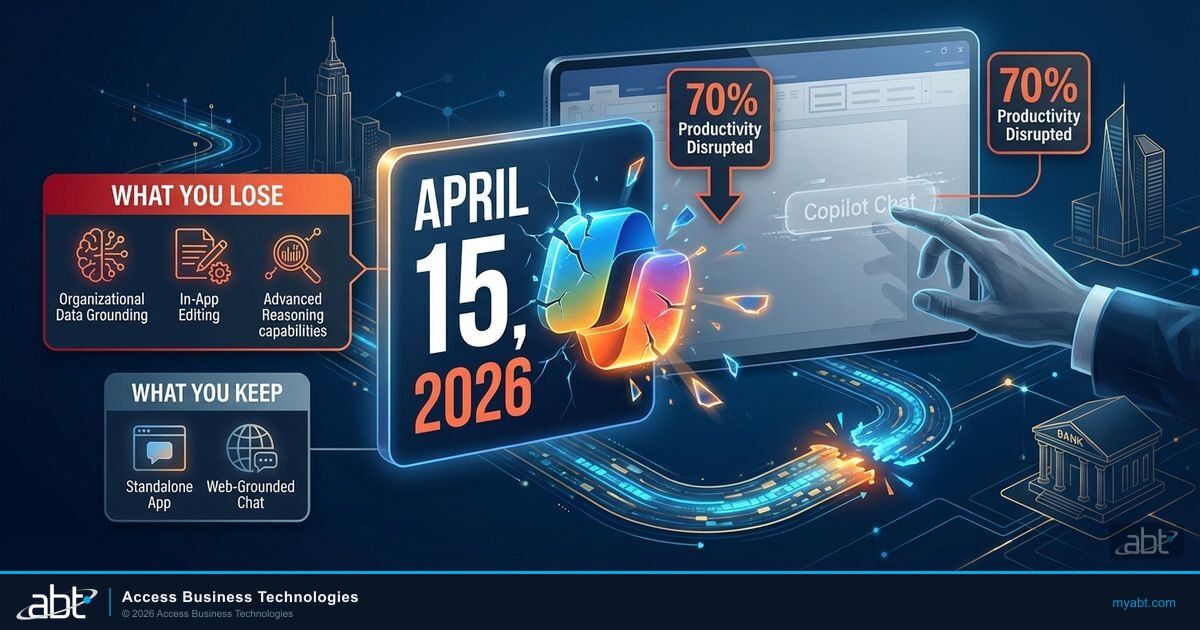
On April 15, 2026, the Copilot your team had been using inside Word, Excel, PowerPoint, and OneNote was downgraded. Not removed entirely. Downgraded. And unless your IT director was tracking Microsoft 365 Message Center posts, there is a good chance no one at your institution saw it coming.
Microsoft announced the change through two separate admin notifications (MC1253858 and MC1253863) delivered to different audiences based on tenant size. Neither notification appeared on any of Microsoft's seven public-facing Copilot documentation pages. The short gap between the announcement and implementation left financial institutions a narrow window to evaluate their licensing and communicate the change to staff.
This matters because your team had been building workflows around Copilot Chat for months. Loan officers asking Copilot to summarize borrower correspondence. Compliance teams using it to draft audit responses. Operations staff generating reports in Excel. On April 15, those workflows broke for users without a paid Microsoft 365 Copilot license.
What Actually Changes on April 15
Microsoft is splitting the Copilot experience into two tiers with distinct labels. Users without a paid Microsoft 365 Copilot license will see "Copilot Chat (Basic)." Users with the $30/month add-on will see "M365 Copilot (Premium)." The labels are new. The restrictions behind them are what matter.
For organizations with more than 2,000 Microsoft 365 seats, Copilot Chat disappears completely from Word, Excel, PowerPoint, and OneNote. No button. No side panel. No "Edit with Copilot." It is gone from those four applications for every unlicensed user in the tenant.
For organizations under 2,000 seats (which includes most credit unions, community banks, and smaller mortgage companies), the in-app Copilot experience remains but gets throttled under "standard access." That means availability may vary during peak demand, and users will see persistent upgrade prompts for the paid license.
Who Gets Hit and Who Doesn't
The split between large and small organizations caught many administrators off guard. Microsoft delivered MC1253858 only to tenants with more than 2,000 seats. Smaller organizations received MC1253863, which describes the same April 15 date but frames the change as "standard access" governance rather than outright removal.
Here is the practical breakdown of what stays and what goes for unlicensed users.
What You Lose (2,000+ Seats)
- Copilot side panel in Word, Excel, PowerPoint, OneNote
- In-app content generation and editing
- Advanced reasoning capabilities
- Model choice (including Anthropic models)
- Agent Mode (Edit with Copilot)
- Organizational data grounding in Office apps
What You Keep
- Copilot Chat in the standalone M365 Copilot app
- Copilot in Outlook (inbox and calendar grounding)
- Web-grounded chat at copilot.microsoft.com
- Word, Excel, PowerPoint agents via the Copilot app
- Microsoft Teams chat (no premium features)
- Commercial data protection on all remaining features
For organizations under 2,000 seats, the in-app experience remains but operates under "standard access." Microsoft has not published what standard access means in measurable terms, only that "availability may vary during periods of high demand" and that licensed users receive priority.
The Documentation Gap
As of April 6, 2026, Microsoft's public Copilot Chat support page still states that users can access Copilot Chat in Microsoft apps "all at no extra cost, and you don't need a Copilot add-on license." This page has not been updated to reflect the April 15 changes. Microsoft acknowledged to Computerworld that the documentation needs updating but has not provided a timeline.
The Real Impact for Financial Institutions
The licensing change is straightforward. The operational impact is where it gets complicated for credit unions, community banks, and mortgage companies.
Consider what happened when a loan officer at a mortgage company opened Word on April 16. For months, they had been using the Copilot side panel to ask questions about borrower documents, summarize correspondence threads, and draft disclosure language. After the change, that side panel is gone. They can still open the separate Copilot app and type a question, but it will return web-grounded responses rather than answers based on their organization's files and data.
A compliance officer opens a 40-page regulatory response in Word, highlights key sections, and asks Copilot to "summarize the GLBA requirements mentioned in this document." Copilot reads the document, identifies the relevant sections, and produces a grounded summary based on the actual file content.
The same compliance officer opens the same document. The Copilot button is gone from Word. They open the Copilot app separately, ask the same question, and get a generic web-sourced answer about GLBA requirements that has no connection to their specific document or regulatory submission.
This distinction matters for financial institutions more than for most industries. Your teams work with sensitive borrower data, regulatory documents, and compliance frameworks daily. The value of Copilot in Office apps was never the chat interface itself. It was the ability to reason over your organization's actual files while staying inside your commercial data protection boundary.
With 70% of Copilot users reporting increased productivity according to Microsoft's Work Trend Index, the disruption affects real workflows that your staff has spent months building. The question is not whether to keep Copilot access. The question is how to license it cost-effectively now that the change is in effect.
Across the 750+ financial institutions ABT manages, early Copilot adopters built their highest-value workflows inside Word and Excel, not in the standalone chat app. Loan document review, compliance drafting, and financial modeling are where productivity gains compound. Losing in-app Copilot access breaks exactly the workflows that justify the investment. Microsoft's own data shows 85% of Copilot users create first drafts faster (Microsoft Work Trend Index, 2025), and that productivity specifically depends on in-app document grounding.
Source: ABT CSP Partner Analysis, Microsoft Work Trend Index 2025
Your Copilot Licensing Options
If your institution decides to maintain full Copilot access in Office apps, three licensing paths are available today. The economics differ significantly depending on your current Microsoft 365 plan and seat count.
| License Option | Monthly Cost per User | What You Get | Best For |
|---|---|---|---|
| Copilot Business (promo) | $18/user ($21 list) | Full Copilot in all Office apps, 1-300 seats, requires Business SKU | Credit unions and community banks under 300 users |
| M365 Copilot (Enterprise) | $30/user | Full Copilot in all apps, Work IQ, deep reasoning, model choice, no seat cap | Larger FIs on E3/E5 plans |
| M365 E7 (all-in) | $99/user | E5 + Copilot + Agent 365 + Security Copilot + Purview bundled | FIs wanting full AI + security stack, GA May 1 |
The Copilot Business promotional pricing at $18/user runs through December 31, 2026. For institutions on Business Premium plans, the bundled price of $32/user/month includes both Business Premium and Copilot Business, and on July 1, 2026 that $32 becomes a permanent Microsoft SKU at the same price rather than rising.
For institutions that do not need every user on Copilot, a targeted deployment makes more financial sense than a blanket rollout. Not every role at your institution needs in-app AI assistance. Loan officers who work with borrower documents daily will feel the loss immediately. Front desk staff who primarily use Outlook may not notice, since Copilot in Outlook remains free for all users.
The April 15 change is not a removal. It is Microsoft drawing a line between users who get web-grounded chat and users who get document-grounded intelligence. For financial institutions, document grounding is where the value lives.
What ABT Recommends Right Now
With the change now in effect, here is what your IT team should prioritize.
Audit Your Current Copilot Usage
Identify which users are actively using Copilot in Word, Excel, and PowerPoint today. If you are an ABT-managed institution, Guardian Productivity Insights already tracks this data at the user level. Run a Copilot readiness assessment to identify who lost access and who is unaffected.
Classify Users by Role Priority
Not every user needs full Copilot. Sort your staff into three categories: critical (loan officers, compliance, operations who use Office daily), beneficial (occasional document work), and unaffected (primarily Outlook users). License the critical group first.
Lock In Promotional Pricing Now
Copilot Business at $18/user is available through December 31, 2026. If your institution runs Business Premium, the bundled $32/user rate becomes a permanent Microsoft SKU on July 1, 2026 at the same price. Locking your annual term before the July 1 Microsoft 365 list-price increase freezes your other plan rates for the term, and for 300-plus-seat institutions a three-year enterprise Copilot commitment carries a 15% discount through September 30, 2026.
Communicate the Change to Staff
If some users lost Copilot access in Office apps, make sure they understand what changed. Explain that Copilot in Outlook and the standalone Copilot app still work. This prevents a flood of helpdesk tickets from confused staff wondering why their tools disappeared.
The Bigger Picture: E7 and What Comes After
Microsoft 365 E7 reaches general availability on May 1 at $99/user/month. E7 bundles E5, Copilot, Agent 365, Security Copilot, and Purview into a single SKU. For institutions already on E5 with separate Copilot licenses, E7 often saves $15/user compared to buying each component individually. The April 15 Copilot restriction is one piece of a broader licensing realignment that continues through July 2026 price increases.
Is Your Institution Still Sorting Out the April 15 Copilot Change?
ABT's license planning review includes:
- Current Copilot usage audit across all users and Office apps
- Role-based license recommendation (who needs Premium, who stays on Basic)
- CSP pricing analysis and annual-term rate lock before the July 1 Microsoft 365 increase
- Migration plan to keep critical workflows running for affected users
Frequently Asked Questions
No. Copilot in Outlook with inbox and calendar grounding remains available for all Microsoft 365 commercial users regardless of whether they have a paid Copilot license. The April 15 change only affects Word, Excel, PowerPoint, and OneNote.
Organizations under 2,000 Microsoft 365 seats keep in-app Copilot access, but it operates under "standard access" starting April 15. Microsoft has not defined standard access in measurable terms, only that availability may vary during high demand and licensed users receive priority. Users will also see persistent upgrade prompts for the paid Copilot license.
Copilot Chat Basic is the free tier available to all Microsoft 365 commercial users. It provides web-grounded chat through the standalone Copilot app and Outlook integration. M365 Copilot Premium is the $30/month paid license that includes full in-app Copilot in Word, Excel, PowerPoint, OneNote, and Teams, plus Work IQ organizational data grounding, advanced reasoning, model choice, and priority access.
Microsoft 365 Copilot Business is $21/user/month at list price, with a promotional rate of $18/user/month through December 31, 2026. The Business Premium + Copilot Business bundle is $32/user/month, which becomes a permanent Microsoft SKU at the same price on July 1, 2026. These prices are available through CSP partners like ABT and apply to organizations with 1 to 300 seats on Business SKU plans.
Yes. Microsoft 365 Copilot licenses are assigned per user, not per tenant. You can license loan officers and compliance staff who rely on in-app Copilot daily while leaving other users on the free Copilot Chat Basic tier. ABT recommends starting with your highest-impact roles and expanding as you measure ROI, which is the approach most of the 750+ financial institutions we manage have taken.