In This Article
- What Changed in July, and What Changes in October
- Why a Key Container Outranks a Routine Hardening Notice
- The Windows Server 2012 and 2012 R2 Exception
- What the ACL Change Actually Removes
- Using the Audit Window: A Practical Checklist
- Harden AD FS, or Leave It Behind
- What Examiners Will Ask
- What ABT Does About This
- Frequently Asked Questions
If your credit union, community bank, or mortgage company still uses Active Directory Federation Services to sign users in to Microsoft 365, the October 2026 Windows security update is going to change permissions on one of the most sensitive objects in your directory. It will do it by default. Nobody has to approve it.
The change itself is a security improvement, and it addresses a real vulnerability that attackers are already using. It also lands automatically on servers you may not have inventoried, it removes access that legitimate service accounts may currently depend on, and it skips two Windows Server versions entirely.
Microsoft opened a three month window in July so administrators could find those problems before the change enforces. It closes on October 13. ABT manages Microsoft 365 for more than 750 credit unions, community banks, and mortgage companies, and federation posture is one of the first things we inventory. Here is what we tell them to look at.
The short version for financial institutions
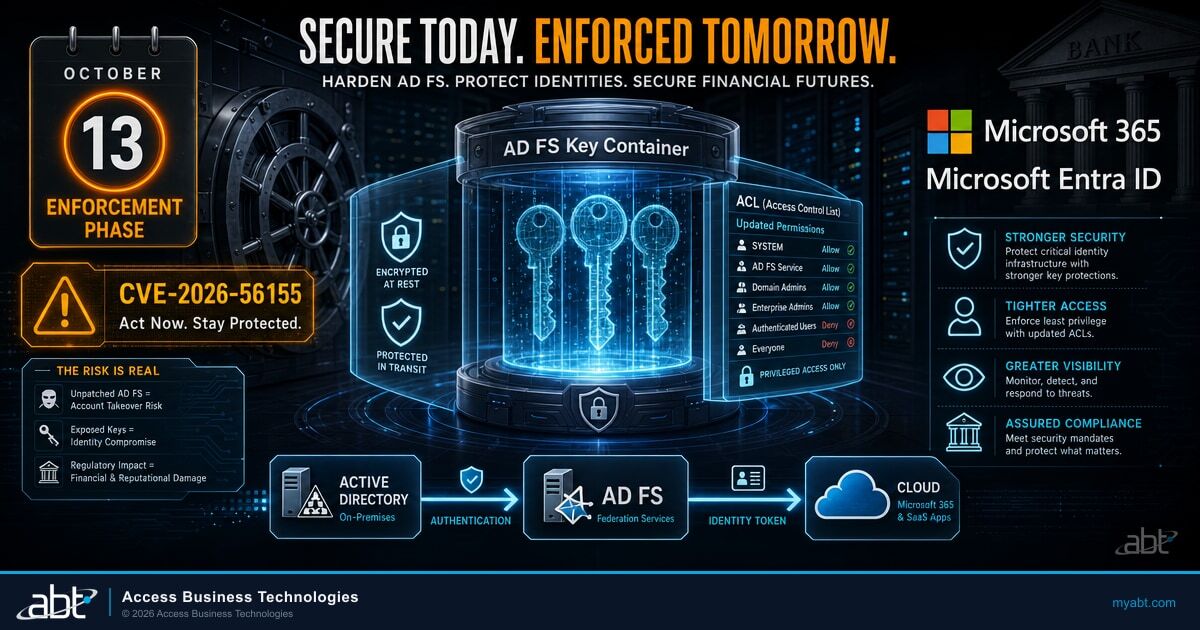
The July 2026 Windows security update started watching the permissions on the AD FS Distributed Key Manager container and logging what it finds. The October 2026 update starts fixing them, by default, on Windows Server 2016 and later. Windows Server 2012 and 2012 R2 are not fixed automatically and need manual work. The underlying flaw, CVE-2026-56155, is on the CISA Known Exploited Vulnerabilities catalog, which means it is not theoretical.
What Changed in July, and What Changes in October
Two separate things happened here, and collapsing them into a single October item is the most common way institutions get this wrong.
The first is the vulnerability itself. CVE-2026-56155 was published on July 14, 2026. The National Vulnerability Database describes it as insufficient granularity of access control in Active Directory Federation Services that lets an authorized attacker elevate privileges locally, and assigns it a CVSS 3.1 base score of 7.8, in the High band. Microsoft rates the same flaw Important on its own severity scale. Those are two different scales measuring the same issue, so both numbers are correct and neither one contradicts the other.
The attack vector is local. This is not remotely exploitable. An attacker does not reach it over the internet; they need to already be on the box or already hold a low privileged account in the environment. What they get in exchange is the ability to read key material they should never have been able to read.
The second thing is the operational change, and it runs on its own clock. Microsoft published a support article, CVE-2026-56155: AD FS Distributed Key Manager container ACL hardening, that lays out a two phase rollout, and reinforced it in the Microsoft 365 message center with a 90 day reminder, message MC1442510.
Audit phase begins. The July Windows security update starts detection. AD FS checks the Distributed Key Manager container one minute after the service starts, then every 24 hours. It logs what it finds and changes nothing. Remediation is disabled by default in this phase; an administrator can set it on deliberately to test.
The window. This is the period to find out which of your servers are flagged, which accounts currently hold permissions on that container, and whether removing them breaks anything. Testing here is cheap. Testing in October is not.
Enforcement phase begins. With the October update, AD FS on Windows Server 2016 and later remediates an insecure container by default. The polarity of the setting flips: what was off by default in July is on by default in October. Doing nothing is now a decision to let the change apply.
The behavior is controlled by a single registry value, a DWORD named RemediateDkmAcl under HKEY_LOCAL_MACHINE\SOFTWARE\Microsoft\ADFS. During the audit phase it is disabled by default and you set it to 1 to opt in. During the enforcement phase it is enabled by default and you set it to 0 to opt out.
Opting out is supported, but it is narrow. It stops the remediation. It does not stop the detection or the underlying exposure, and the event that flags an insecure container keeps firing either way.
Why a Key Container Outranks a Routine Hardening Notice
Microsoft ships permission hardening changes regularly, and most of them do not deserve a project plan. This one does, because of what lives in the object being hardened.
AD FS stores the key material that protects its private token signing and token encryption keys in the Distributed Key Manager container in Active Directory. Microsoft's support article is direct about the consequence of getting the permissions wrong: an attacker with read access to an over permissive container can decrypt the token signing private keys.
Token signing keys are what make a federated sign in trustworthy. Your AD FS farm signs an assertion that says a user authenticated, and Microsoft 365 accepts it because the signature checks out. An attacker holding those keys does not need to steal a password, phish a session, or defeat a second factor. They can sign their own assertion, for any user, including one that already claims multifactor authentication was performed.
Multifactor authentication protects the moment a person signs in. It does not protect a signature that says a person already did.
That is not an argument against multifactor authentication, which remains one of the highest return controls in identity security and the reason we keep writing about why FFIEC, NCUA, and OCC examiners now expect FIDO2, passkeys, and hardware keys. It is an argument for treating federation key material as a separate control with its own owner, the same conclusion we reached about the identity token service flaw in CVE-2026-40379.
CISA added CVE-2026-56155 to its Known Exploited Vulnerabilities catalog on July 14, 2026, the same day it was published, with a federal remediation due date of July 28, 2026. That date applies to federal civilian agencies, not to credit unions, community banks, or mortgage companies. What the listing establishes for everyone else is that the flaw is being exploited in the wild, and that is the fact that should drive your calendar.
The Windows Server 2012 and 2012 R2 Exception
Automatic does not mean everywhere
Windows Server 2016, 2019, 2022, version 23H2, and 2025 are remediated automatically once the enforcement phase begins. Windows Server 2012 and Windows Server 2012 R2 are not. Microsoft's message center notice states it plainly: those versions require manual remediation and are not automatically remediated. The manual path includes granting the AD FS service account WriteOwner and WriteDacl permissions before remediation can be enabled at all.

The reasonable takeaway from a notice that says enforcement begins in October and remediation runs by default is that October handles it. For a farm still on 2012 or 2012 R2 it does not. Detection still runs on those servers and the insecure state event still fires, so nothing goes quiet. But the fix will not arrive on its own.
Both of those Windows Server versions are also past end of support, which means the AD FS farm running on them is carrying more than this one issue.
What the ACL Change Actually Removes
Remediation is not subtle. When it runs, it disables inheritance on the Distributed Key Manager container, discards every inherited access control entry, and strips explicit Allow permissions that are not part of Microsoft's baseline.
| Principal | Rights retained after remediation |
|---|---|
| Domain Admins | Generic All (full control) |
| Enterprise Admins | Generic All (full control) |
| SYSTEM | Generic All (full control) |
| AD FS service account | Read, Write, Create Child, Write Owner, Delete Tree |
In a directory that has been in production for a decade, the list of everything else is rarely empty. Backup agents, monitoring service accounts, delegated identity administrators, migration tooling left over from a past project, and homegrown automation all accumulate permissions on objects like this one, and the person who granted them is often no longer the person maintaining them. Surfacing that list is what the audit phase is for.
Automatic remediation is not a guarantee of a clean outcome. It can fail, and Microsoft logs it when it does.
| Event ID | What it means | What to do |
|---|---|---|
| 1132 | The container permissions do not match the expected secure state | Treat as an open finding, not noise. This is the one to alert on. |
| 1133 | The container permissions are in the expected secure state | Record it. This is your evidence the server is clean. |
| 1134 | The detection task hit an error | Investigate. A detection that cannot run tells you nothing about the state. |
| 1135 | Remediation succeeded, and the previous permissions are logged in SDDL format | Capture it. It is the contemporaneous record of what the permissions were before. |
| 1136 | Remediation failed | Do not assume enforcement fixed the server. Work it manually. |
Event 1135 is the one to forward somewhere retained. These are Windows event logs on the AD FS server, not Microsoft 365 audit data, so they need their own collection path rather than riding along with the tenant side; the same retention question we walk through in how long Microsoft 365 keeps audit data and what examiners expect you to hold applies here on a separate pipeline. Treat the prior access control list in that event as diagnostic evidence for a tested recovery process, not as a restore procedure in itself.
Using the Audit Window: A Practical Checklist

The work here is not complicated. It is mostly inventory and attention, and it is far easier to do before October 13 than after.
Not sure which of your servers still federate?
Most institutions we talk to are surprised by at least one answer in this inventory. ABT manages Microsoft 365 for more than 750 credit unions, community banks, and mortgage companies, and walking your federation footprint is a short conversation that ends with a written list of what you have, what is flagged, and what October will and will not touch.
Harden AD FS, or Leave It Behind
There are two decisions on the table here and they run on different timelines. Confusing them is how institutions end up doing neither. The immediate one is about October: whatever else is true, the servers you have today need to reach the enforcement date in a known state, and that work is small enough that there is little reason to defer it.
The strategic one is whether to keep running federation servers at all. That is a genuine choice with real tradeoffs, not a foregone conclusion, and it should not be rushed into the window that remains because of one advisory.
The AD FS decommission guide on Microsoft Learn recommends moving to Microsoft Entra ID and names three supported cloud authentication options: Password Hash Synchronization, Certificate Based Authentication, and pass-through authentication. Microsoft states the first two are preferred, and that pass-through authentication should be used where there are regulatory requirements not to synchronize any password information to the cloud.
That last clause is the one that matters most in this industry, and it is a legitimate path rather than a workaround. It is also the option we spend the most time scoping with regulated institutions, for exactly that reason. The tradeoff is worth knowing before you plan the migration rather than during it: pass-through authentication keeps password validation on premises, which means you keep authentication agents and their availability inside your own scope.
Harden and keep AD FS
Right answer when federation supports applications that genuinely cannot move yet, or when a migration would collide with a core conversion or an examination cycle.
Cost: you keep owning federation servers, their patching, their certificates, and their key material, and you carry the next advisory too.
Migrate to Entra ID
Right answer when the remaining relying parties can move. Removes the on premises key material that this advisory is about, and consolidates identity policy where Conditional Access already lives, the same direction as passkeys becoming the default while SMS and voice multifactor authentication retire.
Cost: a real project. Application inventory, authentication cutover, and a testing period.
If you want to know how much of your federation footprint could actually move, Microsoft answers that inside your own tenant. Entra ID surfaces a built-in recommendation when a tenant has applications on AD FS that can be fully migrated, and Staged Rollout lets you move selected groups of users to cloud authentication and watch what happens before committing.
The signal worth noticing is where CISA pointed. The Known Exploited Vulnerabilities entry for this flaw does not only link Microsoft's patch guidance. Its notes also link Microsoft's AD FS decommission guide. A federal catalog of actively exploited vulnerabilities pointing at the vendor's own retirement path alongside the fix is worth noticing, though we read that as a signal rather than as CISA recommending migration.
Across the Microsoft 365 tenants ABT manages, that is the same direction we plan toward: keep the federation servers healthy through October, and use the audit window to find out how much of the footprint could move rather than assuming it cannot.
What Examiners Will Ask
Examiners generally focus less on a registry value by name than on whether the institution identified the issue, decided what to do, implemented the decision, and documented all three.
The 2021 FFIEC interagency guidance on Authentication and Access to Financial Institution Services and Systems describes a layered security approach built on preventive, detective, and corrective controls. That guidance is risk based. It does not require this Microsoft change, it does not require Entra ID, and it does not require any particular vendor. What it does give you is a clean way to organize the answer.
This one change happens to touch all three layers at once, which makes it an unusually tidy thing to document:
- Preventive: the hardened access control list on the key container, restricting who can read the material that protects token signing keys.
- Detective: monitoring for event 1132 and treating it as a finding rather than log noise.
- Corrective: the remediation itself, plus a documented manual path for the servers that enforcement will not touch.
It is also a good item to walk a board or supervisory committee through, because it is concrete and it has a date attached, and the framing in what NCUA and FFIEC examiners expect from board IT reporting applies directly.
The evidence to keep
A list of federation servers with their Windows Server versions, the 1133 or 1135 events proving each one reached a known good state, a separate documented plan for any 2012 or 2012 R2 server, and a written decision on whether you let remediation apply or opted out and why. Four artifacts. All of them are byproducts of doing the work, not extra work.
What ABT Does About This
ABT manages Microsoft 365 tenants for more than 750 credit unions, community banks, and mortgage companies as a Tier-1 Microsoft Cloud Solution Provider. In practice that means we administer those tenants directly under delegated admin rather than reselling licenses and stopping at the invoice. We have been managing Microsoft identity for financial institutions since 1999, which covers the arrival of AD FS and the entire migration to cloud authentication that followed.
The tenant side of this is squarely our work: identifying which of your domains still federate rather than using cloud authentication, reviewing the Entra ID recommendations that flag migratable AD FS applications, planning and running the migration to Password Hash Synchronization, Certificate Based Authentication, or pass-through authentication, and tightening the Conditional Access posture that governs sign in once federation is out of the path.
That tenant-side posture is what M365 Guardian is: the configuration baseline and drift monitoring ABT maintains across Conditional Access, Entra ID, and the rest of the Microsoft 365 security stack in the tenants we manage. It does not touch your domain controllers or your federation servers. It is the reason that once federation is out of the sign in path, the control that replaces it is a governed one rather than a default one.
Where your AD FS servers run in an Azure environment we host, we operate them with you. Where they run in your own data center, we work alongside your internal team: we tell you what to look for, review what the detection found, and build the decision and the documentation with you, and your administrators apply the change on the box.
Get the federation inventory before October, not after
ABT manages Microsoft 365 for more than 750 credit unions, community banks, and mortgage companies. We will map which of your domains still federate, which servers the October update will skip, and what your options look like if you decide to leave AD FS behind, and you keep the written record either way.
Frequently Asked Questions
No. Remediation dates in the CISA Known Exploited Vulnerabilities catalog apply to federal civilian executive branch agencies under CISA's binding operational directives. They do not create a legal obligation for a bank, credit union, or mortgage company. What the listing does tell you is that the flaw is being exploited in the wild, which is the fact that should inform your own risk based timeline. Examiners are far more interested in whether you had a process that noticed and acted than in whether you matched a federal date.
Yes. Setting the RemediateDkmAcl registry value to 0 disables remediation, and Microsoft supports that choice. Understand what it does and does not do, though. It stops the permission change from being applied. It does not remove the underlying exposure, and it does not stop detection, so the event flagging an insecure container keeps firing. If you opt out, treat it as a documented risk acceptance with a compensating plan and a revisit date, not as a way to make the item go away.
Anything that was relying on a permission the baseline does not keep. After remediation the container allows Domain Admins, Enterprise Admins, and SYSTEM at full control, plus the AD FS service account with a specific set of rights, and inheritance is turned off. Backup agents, monitoring accounts, delegated administrators, and custom automation are the usual candidates for losing access. Only your own environment can tell you which of those exist, which is precisely what the audit window is for.
Enforcement will not remediate your server. Microsoft states that Windows Server 2012 and 2012 R2 require manual remediation and are not automatically remediated, and the manual path involves granting the AD FS service account WriteOwner and WriteDacl permissions first. Detection still runs and the insecure state event still fires, so the information is available, but the fix will not arrive on its own. Both versions are also past end of support, so this is a reasonable moment to look at the whole server rather than one container.
Not from this specific risk. Multifactor authentication is extremely effective against attacks on the sign in itself, which is where most identity attacks happen. This flaw concerns the key material that protects token signing keys, and an attacker who can decrypt those keys is not attempting a sign in at all; they are producing a signed assertion that says one already happened. Keep investing in phishing resistant multifactor authentication, and treat federation key material as a separate control rather than something MFA covers.
Only one thing: confirm it. This change affects institutions running AD FS, so if your domains use cloud authentication and no federation servers remain, nothing here applies. The reason to verify rather than assume is that decommissioning often stops one step short. A server gets removed from the load balancer and left powered on, or one legacy application keeps a relying party trust alive. Check which domains are federated and whether any AD FS servers still answer.